 Flippd Help
What keyboard shortcuts does the Flippd web app support?
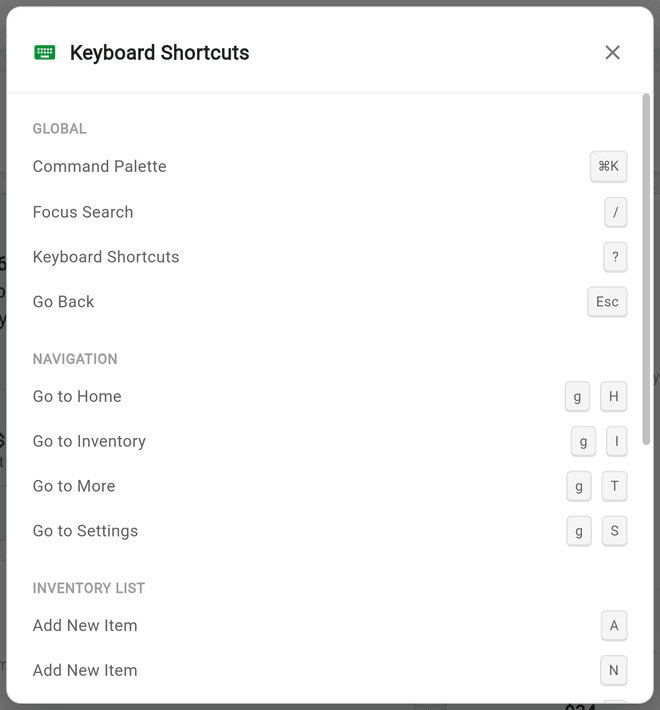
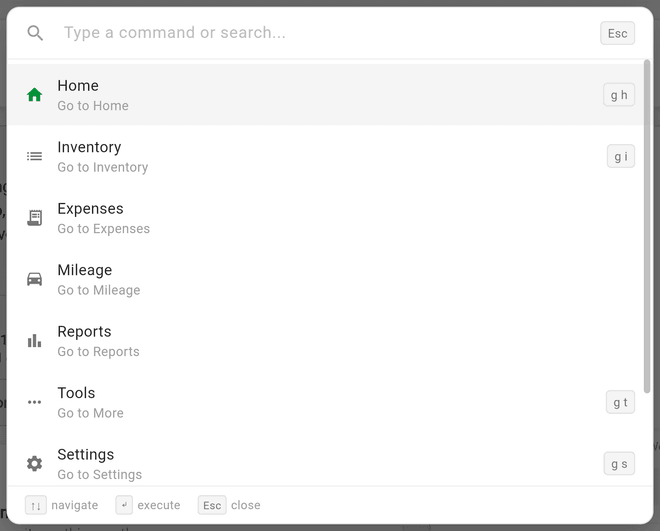
On the web version at app.getflippd.com, press ? at any time to open the Keyboard Shortcuts panel, or press Cmd+K (Mac) / Ctrl+K (Windows) to open the Command Palette and jump anywhere by typing. Shortcuts work on web and desktop only; they are ignored in the mobile apps.
Step-by-Step
- Sign in at app.getflippd.com
- Press ? (or tap the ? help button, then choose Keyboard Shortcuts in the Help sheet) to see the full list
- Press Cmd+K / Ctrl+K to open the Command Palette, type a command or search, use ↑↓ to move, ↵ to run, Esc to close
- Use the shortcuts below. The list is grouped the same way as the in-app panel:
| Group | Shortcut | Mac | Windows |
|---|---|---|---|
| GLOBAL | Command Palette | ⌘K | Ctrl+K |
| GLOBAL | Focus Search | / | / |
| GLOBAL | Keyboard Shortcuts | ? | ? |
| GLOBAL | Go Back | Esc | Esc |
| NAVIGATION | Go to Home | g then h | g then h |
| NAVIGATION | Go to Inventory | g then i | g then i |
| NAVIGATION | Go to More | g then t | g then t |
| NAVIGATION | Go to Settings | g then s | g then s |
| INVENTORY LIST | Add New Item | A or N | A or N |
| INVENTORY DETAIL | Save | ⌘S | Ctrl+S |
The Command Palette lists Home, Inventory, Expenses, Mileage, Reports, Tools, Settings, Add New Item, and Storage. Start typing to filter the list; if nothing matches you'll see No matching commands.
Good to Know
- The in-app Keyboard Shortcuts panel also lists a few inventory-list keys (J, K, ↵, X, F, E, and ⌘A) that aren't wired up yet, so pressing them does nothing for now.