 Flippd Help
How do I use the Profit Calculator before buying an item?
To check if an item is worth buying, go to Tools > Profit calculator, enter the cost and expected sale price, and see your projected profit instantly.
Step-by-Step
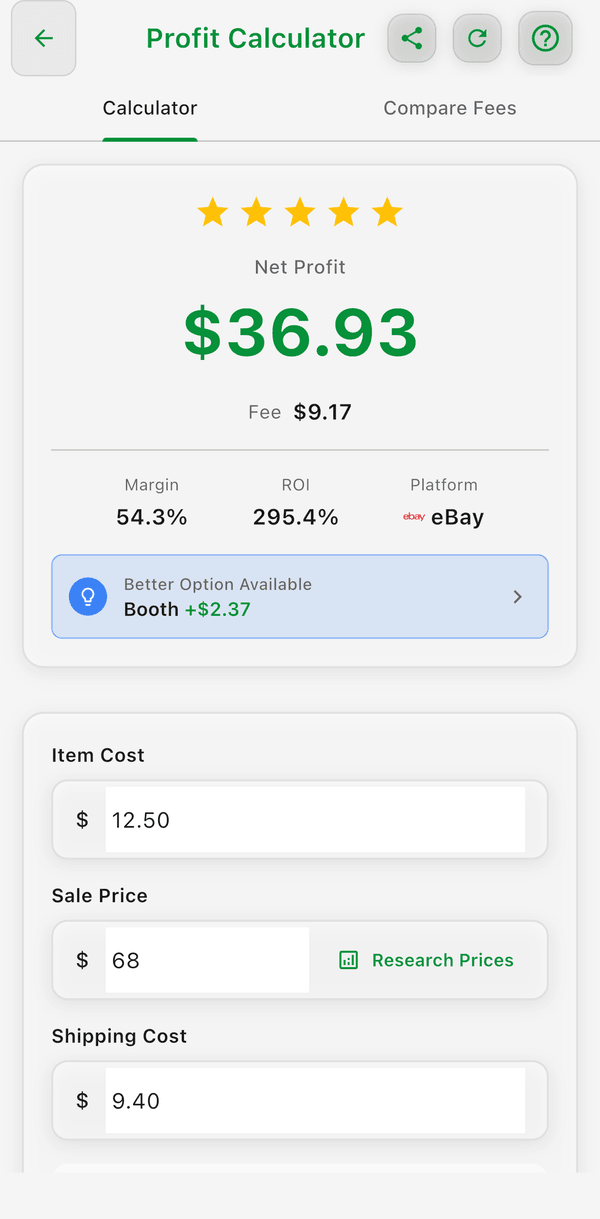
- Go to Tools > Profit calculator
- Enter what you would pay for the item (cost)
- Enter what you think you can sell it for (expected sale price) -- or tap Research Prices to look up eBay listings and fill it in
- Select the platform you plan to sell on
- Enter your estimated shipping cost
- Optionally add a category for better recommendations
The calculator instantly shows:
- Platform fees for the selected platform
- Net profit after all deductions
- ROI (Return on Investment) percentage
- Profit margin
- A star rating (0-5) based on ROI -- 5 stars for over 100% ROI, down to 1 star for 25% or less
If another enabled platform would earn you more than $0.50 more profit, a Better Option Available banner tells you which one. If the numbers don't add up, you'll see This sale would result in a loss.
Compare Fees Tab
The second tab, Compare Fees, takes just a sale price and lists every enabled platform sorted by lowest fee, showing the Fee, what You Keep, and your margin for each. See How do I compare fees across platforms with the Profit Calculator?.
When to Use It
Use the Profit Calculator while sourcing at thrift stores, estate sales, or garage sales. Before you buy something, quickly check if it will actually make you money after fees and shipping.
Good to Know
- The calculator uses current platform fee structures
- Try different platforms to see where you'd make the most profit
- Use Share in the top bar to send the results as text, or Reset to clear the form
- Research Prices is hidden if the Price Comparison toggle is off under Settings > Inventory Preferences > Features