 Flippd Help
How do I mark an item as listed for sale?
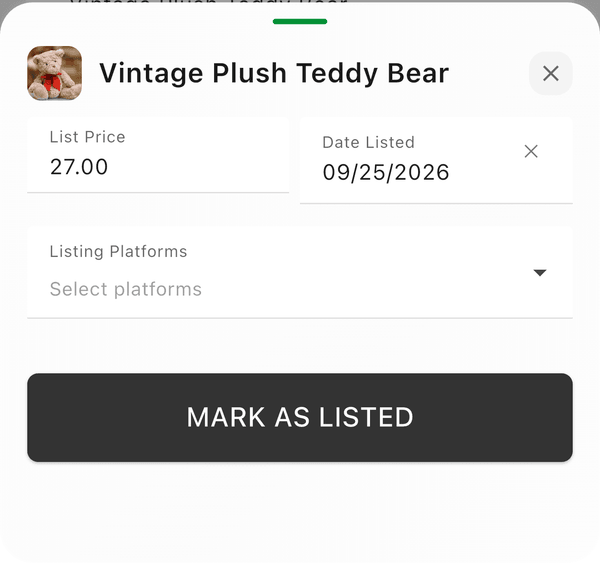
To mark an item as listed, open the item details and tap Mark as Listed, then select the platform and enter your listing price.
This records where you listed the item so Flippd can track it and calculate the right selling fees. It does not create or post a listing on that marketplace — you list on eBay, Whatnot, Poshmark, Mercari, or wherever you sell as you normally would. See Does Flippd list my items on eBay, Whatnot, Poshmark, or Mercari?.
Step-by-Step
- Find the item in your Inventory
- Tap the item to open its details
- Tap Mark as Listed
- Under Listing Platforms, select where you listed it (eBay, Poshmark, Mercari, Whatnot, etc.)
- Enter the List Price
- Check the Date Listed -- it defaults to today and must be on or after the Date Acquired (a future date is only allowed when Allow Future Dates is on in Inventory Preferences)
- Tap Mark as Listed to confirm
The item status changes to Listed and appears in your Listed count on the Home dashboard.
Faster Ways to List
- While adding an item: you don't have to add the item first and list it afterward. On the Add Item screen, tap the ... (more options) menu in the bottom bar and choose Listed -- the new item is saved as Listed in one step (you'll pick the platform and listing price in the same sheet). You can also choose Sold to record an item that already sold.
- From the inventory list: swipe an Unlisted item from left to right and tap Listed.
Listing on Multiple Platforms
If you cross-list an item on multiple platforms, you can update the listing platform later when it sells. The platform selected at sale time is what Flippd uses for fee calculations.
Good to Know
- Once an item is Listed, the inventory list row shows both your cost and your selling price side by side (e.g., $5.00 → $25.00) -- unlisted items only show what you paid
- You can list items that were already posted before you started using Flippd -- add the item and choose Listed from the ... menu right on the add screen
- Date Listed must be on or after the Date Acquired
- Bulk edit lets you list multiple items at once