 Flippd Help
What do the item statuses mean?
Every item in Flippd has a status that tells you where it is in the selling process. Here's what each status means.
Statuses
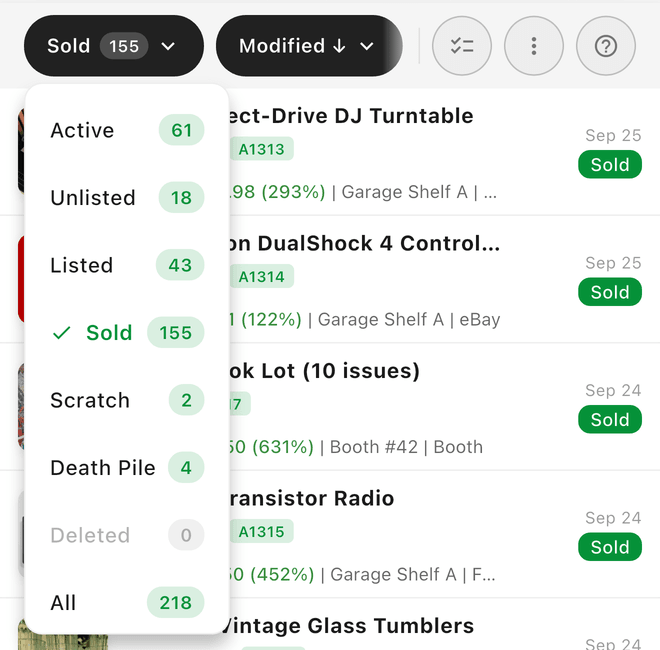
Unlisted -- The item is in your inventory but not yet listed for sale on any platform. This is the default status for new items.
Listed -- The item is actively listed on a selling platform (eBay, Poshmark, etc.). It has a listing price and platform assigned.
Sold -- The sale is complete. Flippd has recorded the sale price, fees, and profit.
Death Pile -- Unlisted items whose Date Acquired is 30 or more days ago. It's a view, not a separate status -- the item stays Unlisted. These items need attention because they're sitting in your inventory without being listed.
Scratch Pile -- Items no longer for sale due to damage, being kept, lost, or other reasons. These are tracked separately so your reports reflect only sellable inventory.
Deleted -- Items you've deleted. They stay in the Deleted filter for 3 days so you can restore them, then they're permanently removed.
How Statuses Change
New Item → Unlisted → Listed → Sold
                ↓
           Death Pile view (Unlisted, Date Acquired 30+ days ago)

Any status → Scratch Pile (manually scratched)
- Adding a new item sets it to Unlisted
- Tapping Mark as Listed changes it to Listed
- Tapping Mark as Sold changes it to Sold
- Unlisted items whose Date Acquired is 30+ days ago show up in the Death Pile view; their status stays Unlisted
- You can scratch an item from any status to move it to the Scratch Pile
Moving Backward
Statuses aren't one-way. Open the item and tap the ⋮ (three dots) menu in the bottom bar:
- Mark as Unlisted -- takes a Listed item off Listed and back to Unlisted (the item keeps all its details; only the listing status and Date Listed are cleared)
- Mark as Unsold -- returns a Sold item to Listed and removes the sale from your reports
- Restore -- brings a Scratch Pile item back to active inventory
- Un-donate -- reverses a donation
What Price Shows on the Inventory List?
The price shown on each row of your inventory list depends on the item's status. If your list only shows what you paid, that's because the item is still Unlisted -- once you list it, your selling price appears too.
| Status | What the row shows |
|---|---|
| Unlisted | Cost of Good (what you paid). Shows "No price set" if the cost is $0. |
| Listed | Cost of Good → List Price (your cost and your selling price, side by side) |
| Sold | Sale price, plus a profit line with your ROI (e.g., "Profit: $25.00 (150%)") |
So to see the price you're selling an item for on the inventory list, mark the item as Listed and enter its listing price. The row then shows both numbers, like $5.00 → $25.00.
Good to Know
- Tap any status counter on the Home dashboard to see items with that status
- You can filter your inventory by status using the filter bar
- Bulk edit lets you change the status of multiple items at once