 Flippd Help
How do I share my sales wins on social media?
To share a sale, open a sold item and tap the Share button. Flippd creates a shareable card showing your flip details that you can post to social media.
Step-by-Step
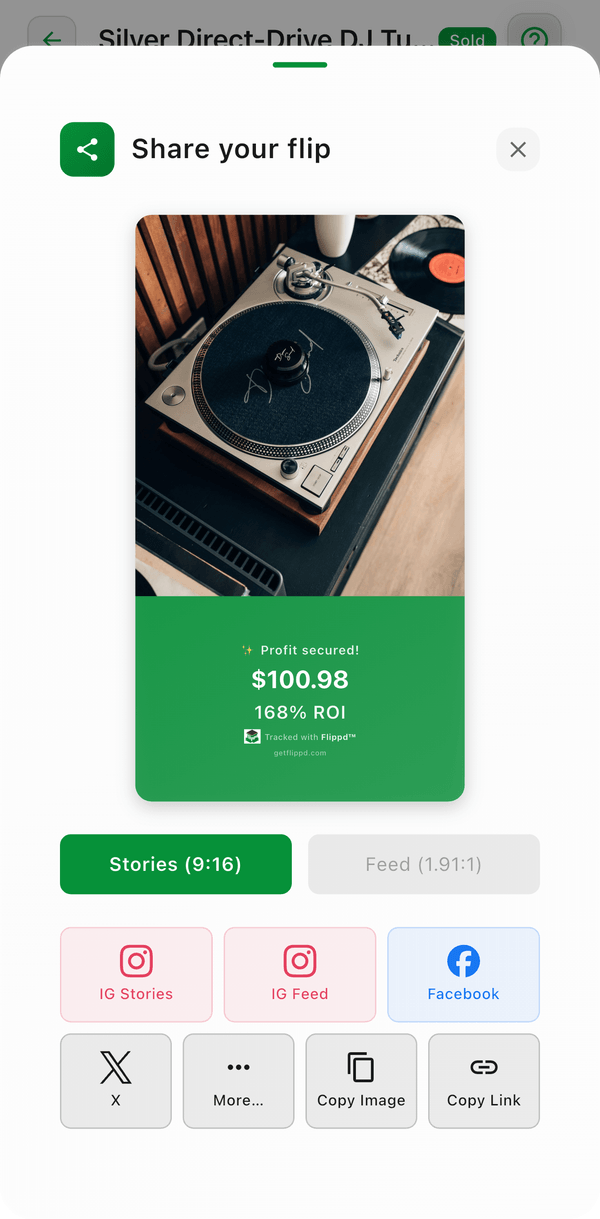
- Open a sold item from your inventory
- Tap the Share button
- Flippd generates a shareable card with:
- Item photo
- Sale details (what you paid vs. what you sold for)
- Your profit
- Choose where to share: Instagram Stories, Instagram Feed, Facebook, X, or More… for any other app -- or Copy Image / Copy Link
- Post and celebrate your win
Good to Know
- Sharing is completely optional -- your financial details are never shared automatically
- You control what information appears on the shared card
- Some share targets aren't available on every platform (you'll see Not available on this platform) -- use More… or Copy Image instead
- Sharing your wins can inspire other resellers and build your brand
- Great for celebrating milestone sales or impressive flips