 Flippd Help
How do I use Price Comparison to research item prices?
To research what an item is selling for, go to Tools > Price lookup (the screen opens as Price Research), enter the item name, and see what similar items are currently listed for on eBay (asking prices), with a one-tap link to eBay's sold listings for the same search.
Three Ways to Search
Text Search
- Go to Tools > Price lookup
- Type the item name or keywords in the search bar
- View the current eBay listings that match
Barcode Scan (mobile app only)
- Go to Tools > Price lookup
- Tap the barcode icon in the search bar
- Point your camera at the item's barcode
- Flippd looks up the product and shows matching listings
Image Search (mobile app only)
- Go to Tools > Price lookup
- Tap the camera icon
- Take a photo of the item or choose from your library
- Flippd identifies the item and shows comparable listings
What You'll See
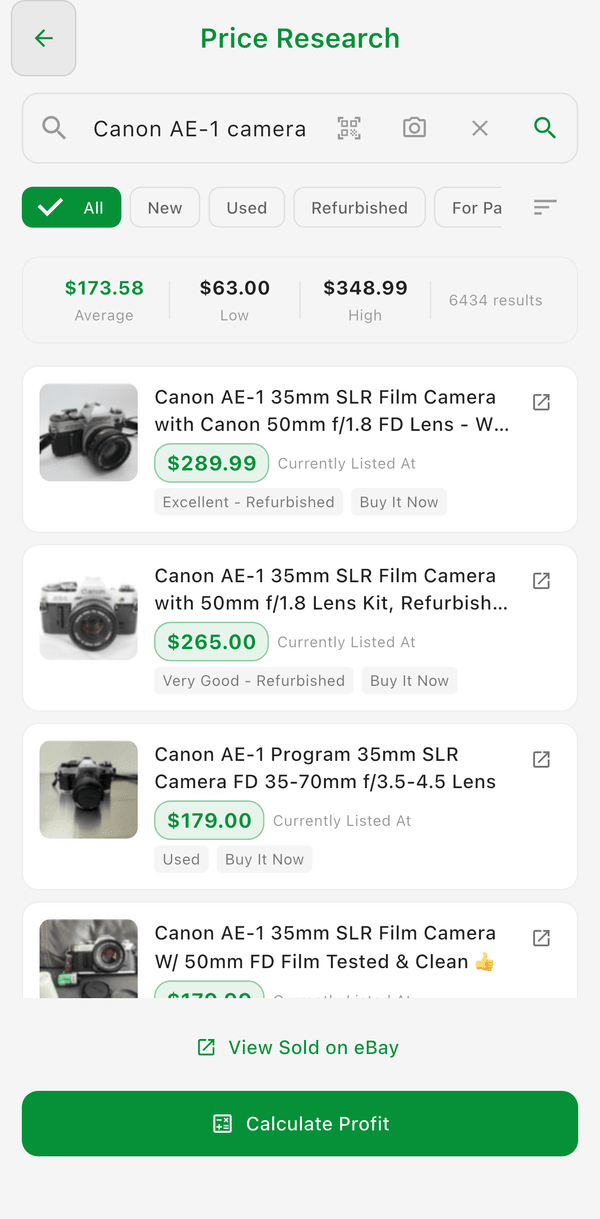
- Currently Listed At prices for similar items on eBay -- up to 25 listings per search
- Price ranges (Low, Average, High)
- Condition filter -- Narrow results to New, Used, Refurbished, or For Parts
- Sort options -- Relevance, Most Recent, Price: High to Low, or Price: Low to High
- View Sold on eBay -- Opens eBay's sold/completed listings for the same search so you can check what items actually sold for
- Calculate Profit -- Sends a price straight into the Profit Calculator
Other Places to Run a Search
- Tap Comps on an inventory item to run the same search in a bottom sheet, then tap Use This Price to set that item's list price
- Tap Research Prices in the Profit Calculator to look up a price and fill in the sale price
Both of these are controlled by the Price Comparison toggle under Settings > Inventory Preferences > Features (on by default).
When to Use It
- Before buying -- Check if an item has a good resale value
- Before listing -- Price your item competitively based on what the market is asking
- When repricing -- See if the market has changed since you originally listed
- While sourcing -- Scan barcodes at thrift stores to quickly check value
Good to Know
- Price Comparison uses live eBay listings ("Powered by eBay") -- results are asking prices, not sold prices; use View Sold on eBay for sold data
- Each account gets 300 eBay comp searches per day; text and image searches share the same limit, and repeating a recent search uses cached results without counting against it
- Combine with the Profit Calculator to check both market price and your actual profit
- Prices fluctuate by season and demand -- check periodically for trending items
- Barcode scanning is the fastest way to check prices while sourcing in-store