 Flippd Help
What's new in User Interface 3.0?
Flippd 3.0 is our biggest visual update yet. The entire interface has been refreshed with a modern design, and the Home screen has been completely redesigned to give you a clearer, faster view of your reselling business.
Launch Status
| Platform | Status | Notes |
|---|---|---|
| iOS | April 26, 2026 | Fully Released |
| Android | April 21, 2026 | Released |
| Web | April 19, 2026 | Released at app.getflippd.com |
Home Screen Redesign
The Home screen has been rebuilt from the ground up to put your most important numbers and actions front and center.
Inventory Pipeline Card
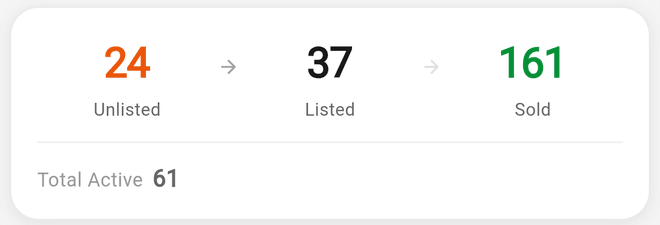
The old layout with six separate metric boxes has been replaced by a single, unified Inventory Pipeline card. It shows your inventory flow at a glance:
Unlisted → Listed → Sold
- Total Active -- The combined count of your Unlisted and Listed items, displayed prominently
- Sold -- Your total sold items count
- Unlisted -- Items not yet listed for sale
- Listed -- Items actively listed on a selling platform
- Death Pile -- Unlisted items acquired 30 or more days ago that need attention
Tap any number to jump directly to that filtered view in your Inventory.
Quick Action Chips
Below the pipeline card, you'll find a new row of four quick action buttons for the things you do most (tablets and desktop also get Mileage and Goals):
- Scan -- Open the barcode scanner to look up or add items
- Expense -- Quickly log a new expense
- Import -- Open Import / export to bring in a CSV or export your data
- Research -- Open price research to compare market prices
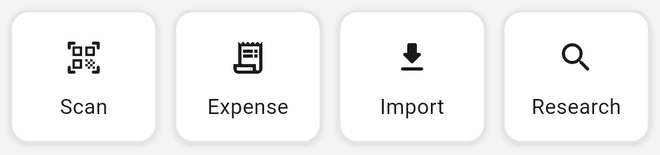
Each chip responds with a subtle press animation and haptic feedback on supported devices.
Goal Card
A new Goal Card appears on the Home screen showing your most urgent active goal -- the one closest to its deadline. Track your progress right from the dashboard without navigating to the Goals screen.
- Tap the card to view full goal details
- Dismiss the card if you'd prefer not to see it on the Home screen
Updated Charts
Your sales and performance charts have been redesigned:
- Sales Chart -- A refreshed sales chart showing the last 7, 30, or 90 days with improved visuals
- Sell-Through Chart -- See how quickly your items are selling as a clear visual metric
Both charts now match the updated design language with cleaner styling and better readability.
Inventory Gauge
The Inventory Gauge has been moved below the charts on mobile for a more natural reading flow. It shows your:
- Death Pile ratio
- Listed count
- Sold count
- Seller level (Collecting, Selling, or Pro, based on your metrics)
New Onboarding Experience
If you're just getting started, the Home screen now shows a guided empty state with helpful tiles for your first steps:
- Scan a Barcode -- Use the scanner to look up products and add them to inventory
- Research Prices -- Search market prices before you buy
- Track an Expense -- Start tracking your business expenses from day one
Navigation Updates
The bottom navigation bar has been updated with new icons and a cleaner layout:
On mobile (phone):
- Home | Inventory | + Add | Reports | Tools
On tablet and desktop:
- Home | Inventory | Expenses | + Add | Mileage | Reports | Tools
The green + Add button remains in the center for quick access to adding new inventory items.
Visual Design Changes
Clean, Neutral Headers
All interior screens now use unified neutral headers. The green app bar backgrounds have been removed from detail screens, giving the app a cleaner, more modern look.
Refreshed Theme
- Light mode -- Warm whites and neutral grays with subtle glass-effect containers
- Dark mode -- True black backgrounds with high-contrast text for comfortable nighttime use
- Both themes feature refined card styling, shadows, and borders throughout the app
Smooth Animations
Screen elements now animate in with staggered fade and slide transitions for a polished feel. If you prefer reduced motion, Flippd respects your device's accessibility settings automatically.
Trademark Branding
The Flippd logo now displays with the trademark symbol across the app as it is a registered trademark for the logo
Good to Know
- UI 3.0 is a visual refresh -- all your data, settings, and inventory remain exactly as they are
- The update is free for all users, no action required
- Light, dark, and system theme preferences are preserved after updating
- If anything looks off after updating, try closing and reopening the app