 Flippd Help
How do I configure mileage deduction rates?
You don't need to set a rate. Settings > Mileage Rates shows the IRS standard mileage rates that Flippd applies automatically to your logged trips based on each trip's date (US businesses). Outside the US, enter the deduction amount on each trip when you log it.
What the Screen Shows
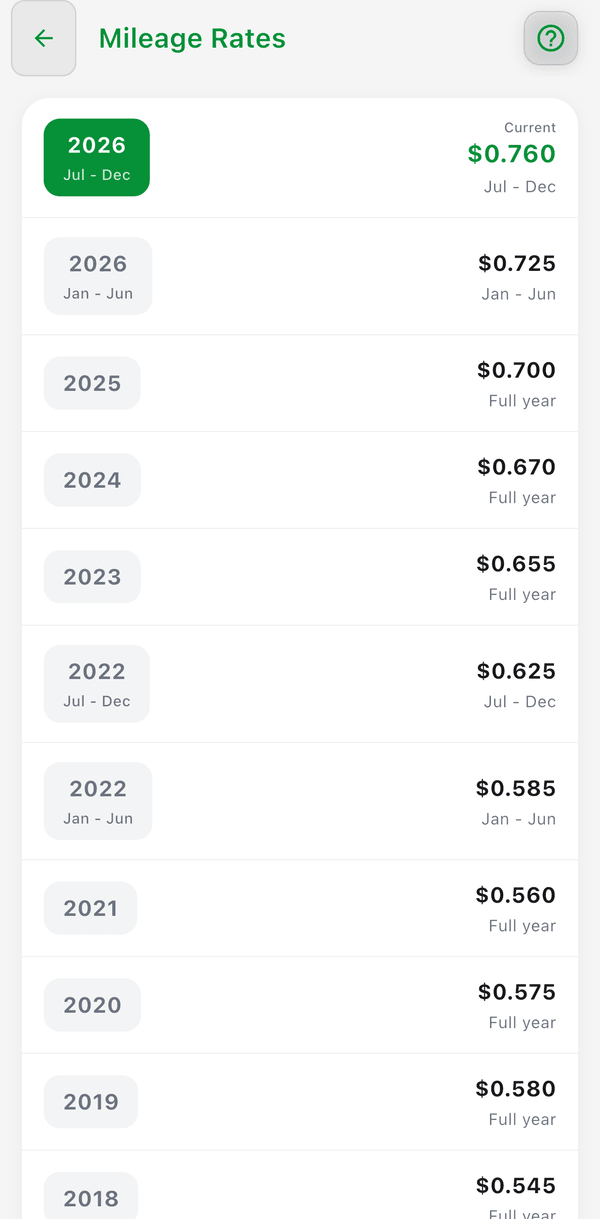
- Go to Settings (tap the gear icon in the top right)
- Tap Mileage Rates
- Review the current and historical IRS standard mileage rates by period -- the rate in effect today carries a Current badge
- Tap Visit IRS Website to open the IRS standard mileage rate page in your browser
The screen is read-only: there is no rate field and nothing to save. Flippd picks the rate that matches the date of each trip when it calculates your deduction.
Current Rates
| Period | Rate per mile |
|---|---|
| 2024 | $0.67 |
| 2025 | $0.70 |
| Jan 1 – Jun 30, 2026 | $0.725 |
| Jul 1 – Dec 31, 2026 | $0.76 |
The IRS updates this rate annually (and occasionally mid-year) -- check irs.gov for the latest rate.
Outside the US
Standard mileage rates are only available for US businesses. If your Business Country is not the US, the Mileage Rates screen explains this and you can manually enter your deduction amount when logging each trip.
Good to Know
- The rate is applied automatically to your logged trips -- a trip dated in 2025 uses the 2025 rate, a trip dated in July 2026 uses the second-half 2026 rate
- Most US resellers should use the IRS standard mileage rate
- Consult a tax professional if you're unsure which method to use