 Flippd Help
How do I map my expense categories to IRS Schedule C lines?
To map your categories, go to Reports, open Schedule C Summary under Tax Reports, then tap the Schedule C Categories icon in the top right. Each expense category is assigned to a line on IRS Schedule C (Form 1040). Built-in categories come pre-mapped, and you can override any of them.
Why This Matters
When you file taxes as a sole proprietor, your business expenses don't get lumped together -- the IRS wants them sorted onto specific numbered lines on Schedule C. This screen does that sorting for you, so your year-end tax report is already organized the way your accountant (or tax software) expects.
Step-by-Step
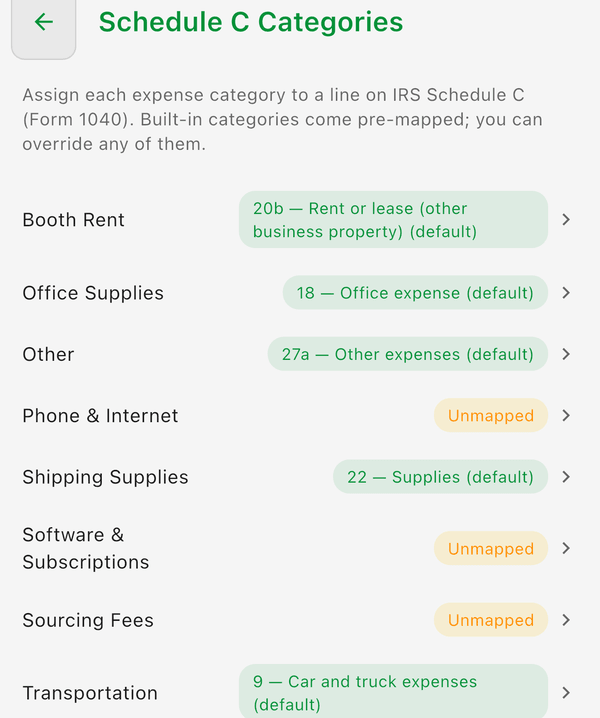
- Go to the Reports tab
- Under Tax Reports, tap Schedule C Summary
- Tap the Schedule C Categories icon in the top right (or tap the amber unmapped-categories warning if one is showing)
- Tap any category row to open the line picker
- Choose the IRS Schedule C line it should report on (or tap Use default to restore the built-in mapping)
- Your choice saves automatically
Default Mappings
Every built-in category comes pre-mapped to a sensible default:
| Category | Schedule C Line | What It Covers |
|---|---|---|
| Platform Fees | 10 -- Commissions and fees | eBay, Etsy, Poshmark, and other selling fees |
| Shipping Labels | 27a -- Other expenses | Postage you pay to ship sold items |
| Shipping Supplies | 22 -- Supplies | Boxes, tape, poly mailers |
| Equipment | 22 -- Supplies | Small gear like printers, shelving, scales |
| Booth / Table Rent | 20b -- Rent or lease (other business property) | Antique-mall booth, market table |
| Storage | 20b -- Rent or lease (other business property) | Storage unit, shelving |
| Subscriptions | 27a -- Other expenses | Listing tools, software, Flippd |
| Travel & Lodging | 24a -- Travel | Hotels, flights for sourcing trips |
| Inventory Purchase | Part III -- Cost of goods sold | What you paid for items you resell |
| Other | 27a -- Other expenses | Anything else business-related |
Common category names you create yourself are pre-mapped too: Advertising (line 8), Office Supplies (18), Transportation (9), Utilities (25), Employees/Staff (26), Rent / Booth Rent / Storage Unit (20b), Shipping / Subscription (27a), and Inventory (Cost of goods sold).
Gas is intentionally left unmapped: actual car costs can't be claimed alongside the standard mileage deduction Flippd already tracks, so decide with your tax professional before mapping it.
Cost of Goods Sold Is Different
Inventory Purchase maps to Part III -- Cost of goods sold, not a regular expense line. This is intentional. Inventory isn't deducted like a normal expense in the year you buy it -- it flows through COGS and is counted against revenue when the item sells. That's why it shows "Part III" instead of a line number.
What's on the Schedule C Summary
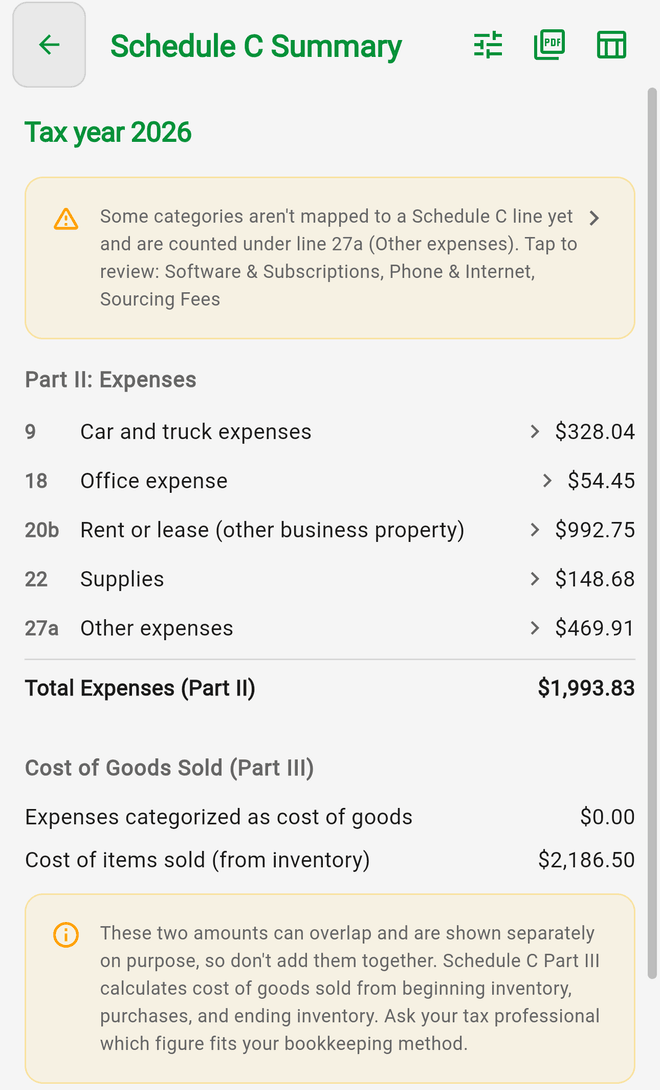
Pick a Tax year at the top. The summary shows your Part II expense lines and total, a Cost of Goods Sold (Part III) section with two separate figures -- expenses categorized as cost of goods, and the cost of items sold from your inventory -- plus your mileage deduction from tracked trips. The two Part III figures can overlap and are shown separately on purpose; don't add them together. Use Export PDF or Export CSV to send the summary to your accountant.
Good to Know
- This feature is for US businesses -- Schedule C is a US tax form, so the screen only appears when your business country is set to the United States
- You can pick from the full list of Schedule C Part II expense lines (8 through 27a) plus the Part III Cost of goods sold bucket
- (default) next to a category means it's using the built-in mapping; once you change it, your override is saved to your account and syncs across devices
- A category shown as Unmapped (in amber) is counted under line 27a (Other expenses) until you map it -- map it if it belongs on a more specific line
- Equipment defaults to Supplies (line 22). That's fine for small, inexpensive gear. A genuinely large equipment purchase may need to be depreciated (a different line) -- check with your tax professional and override the mapping if needed
- Flippd is not tax software and doesn't file taxes for you -- always consult a tax professional