 Flippd Help
How do I record an item I took in trade as part of a sale?
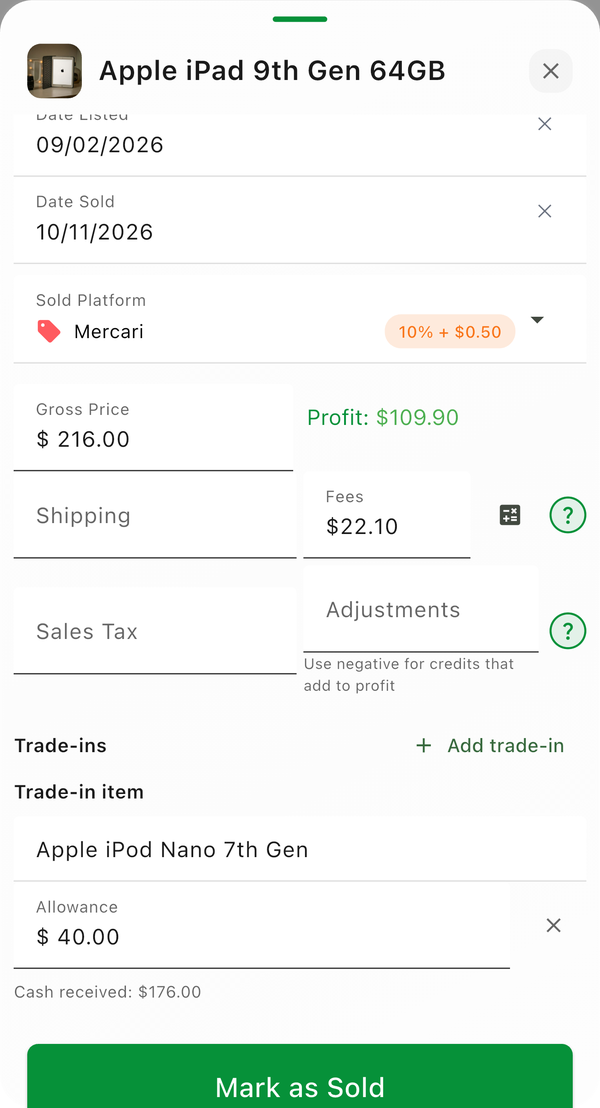
Turn on Trade-ins under Settings > Feature Visibility, then when you Mark as Sold add each item the buyer gave you with the value you allowed for it. The sale keeps its full price, so your profit is right, and each trade-in lands in your inventory as a new item at that value, linked to the sale. Available since version 4.13.0.
Why Not Use Adjustments?
A trade-in is a form of payment, not a cost of the sale. If you sell a watch for 4,500 and take a 500 watch in trade, you still sold the watch for 4,500; you were just paid 4,000 in cash and 500 in goods. An adjustment would lower your profit on the sale and leave no record of the watch you took in. Trade-ins keep the sale price whole and give you the new item at its real cost.
Step-by-Step
- Go to Settings > Feature Visibility and turn on Trade-ins under Manage (it is off by default)
- Open the item you sold and tap Mark as Sold
- Fill in the sale as usual, with the full price the deal was worth
- Under Adjustments, tap Add trade-in
- Type what the buyer gave you and the Allowance you gave for it; tap Add trade-in again for a second item
- Check the Cash received line, which is the sale price minus every allowance
- Tap Sold
What Happens to the Trade-in
Each trade-in becomes a new Unlisted item in your inventory:
- Cost is the allowance you gave
- Date acquired is the sale date
- Source is Trade-in
- Notes names the item it came in on
From there it is an ordinary item. Add photos, set a list price and list it when you are ready. When it sells, its profit is measured against the allowance, exactly as if you had paid cash for it.
The Trade-ins Banner
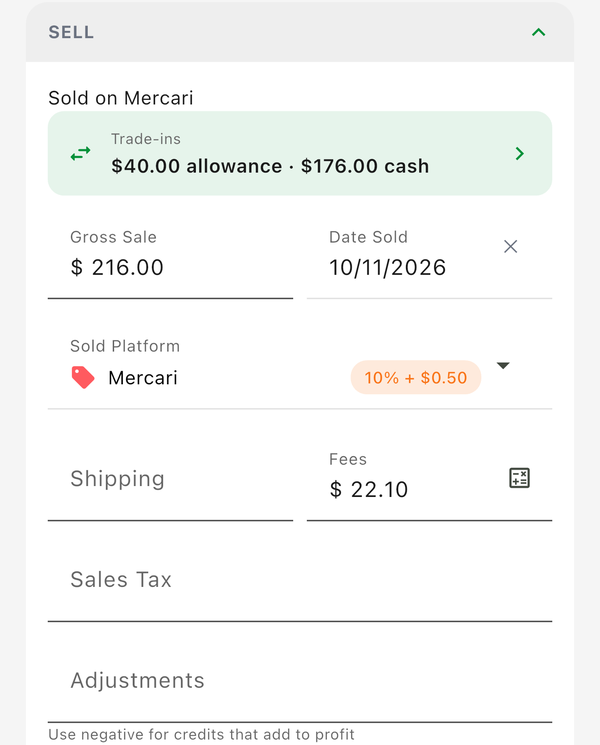
Open the sold item and the Sold section shows a Trade-ins banner with how many items came in, the total allowance and the cash you actually received. Tap it to see each trade-in and open it.
Good to Know
- The allowances cannot add up to more than the sale price. If a buyer traded up and you also paid them cash, record the sale at the value of what you received and add the extra you paid to the trade-in item's cost afterwards.
- Trade-ins are available on the Mark as Sold sheet for one item. They are not on bulk Mark Sold or Sold together.
- Un-selling or editing the sold item does not touch the trade-in items. They stay in your inventory as their own items.
- Reports and profit are unchanged by trade-ins. The sale counts at its full price and the trade-in counts at its cost, so your numbers already tell the whole story.
- If you do not see Add trade-in, check that Trade-ins is on under Settings > Feature Visibility and that you are on version 4.13.0 or later.