 Flippd Help
How do I show or hide features like Labels, Death Pile, and Aging Inventory?
To show or hide features, go to Settings > Feature Visibility and toggle features on or off. Hidden features won't appear in your Home dashboard or the Tools tab, keeping the app focused on what matters to your business.
Step-by-Step
- Tap the Settings gear icon in the top right
- Tap Feature Visibility
- Toggle features on or off under each section:
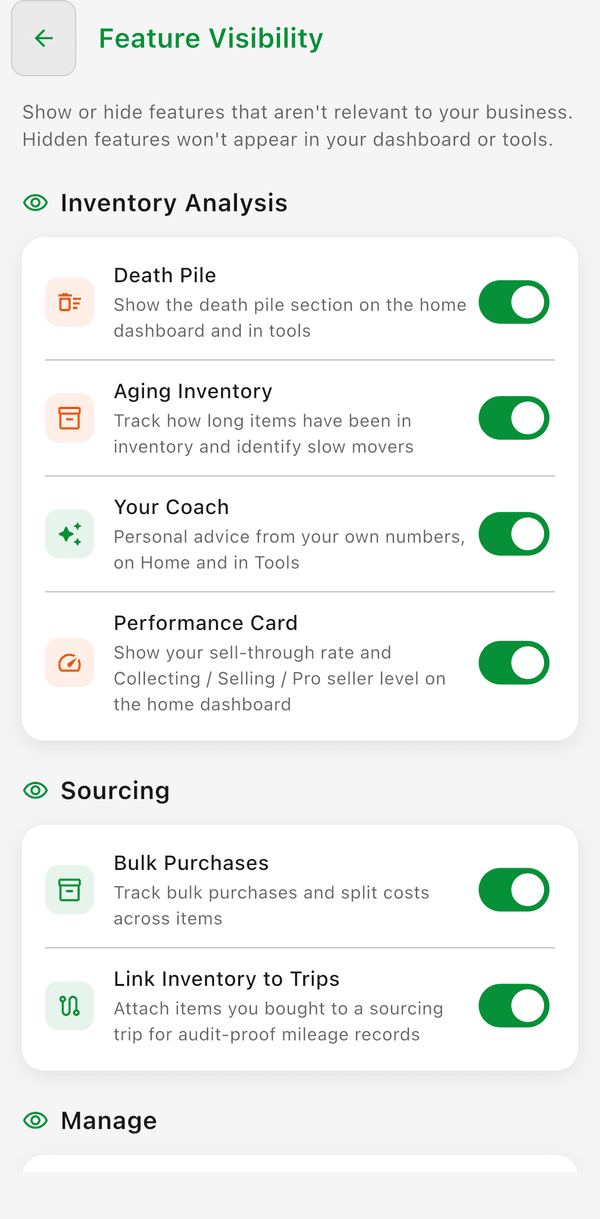
Inventory Analysis
- Death Pile -- Shows or hides the Death Pile counter on your Home dashboard and the Death Pile screen in the Tools tab. When hidden, the Death Pile feature is completely removed from your interface. Items still age in the background, so you can re-enable it anytime to see them.
- Aging Inventory -- Shows or hides the Aging Inventory feature, which tracks how long items have been in your inventory and helps you identify slow movers. Hide it if you don't need to surface older listings.
- Your Coach -- Shows or hides personal advice from your own numbers, on Home and in Tools.
- Performance Card -- Shows or hides your sell-through rate and Collecting / Selling / Pro seller level on the home dashboard.
Sourcing
- Bulk Purchases -- Shows or hides Bulk Purchases in Tools, where you track a lot or bundle and split its cost across the items. On by default.
- Link Inventory to Trips -- Attach items you bought to a sourcing trip for audit-proof mileage records.
Manage
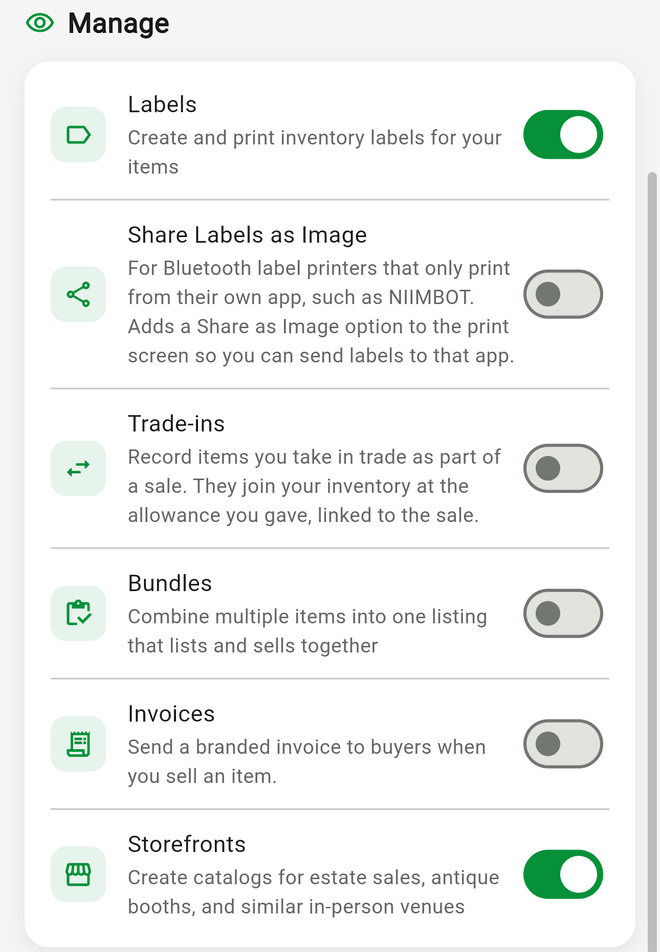
- Labels -- Shows or hides the Labels feature for creating and printing inventory labels and QR codes. Hide it if you don't print labels for your items.
- Share Labels as Image -- For Bluetooth label printers that only print from their own app, such as NIIMBOT. Adds a Share as Image option to the print screen so you can send labels to that app. Off by default. See Why doesn't my Bluetooth label printer show up when I print?.
- Bundles -- Combine multiple items into one listing that lists and sells together. Off by default. See How do bundles work and when should I use them?.
- Invoices -- Shows or hides the ability to send a branded invoice to buyers when you sell an item. Off by default; turn it on to add an Invoice Buyer action to sold items. See How do I create and send an invoice to a buyer?.
- Trade-ins -- Record items a buyer gives you in trade as part of a sale. Each one joins your inventory at the allowance you gave, linked to the sale. Off by default; from version 4.13.0. See How do I record an item I took in trade as part of a sale?.
- Storefronts -- Create catalogs for estate sales, antique booths, and similar in-person venues. On by default. See What are Storefronts and how do I use them?.
Good to Know
- Changes take effect immediately across the app
- Feature visibility settings sync across all your devices, except Bulk Purchases, which is a per-device setting
- Hiding a feature doesn't delete any data -- you can re-enable it anytime and your data will still be there
- If you selected "Booth/Vendor" or "Retail" during onboarding, Death Pile is automatically hidden since items in those businesses are typically always on display
- This is different from Inventory Preferences, which controls which fields appear in your inventory list view. Feature Visibility controls entire app features.