 Flippd Help
How do I use the Inventory Aging report to find slow-moving items?
To find slow-moving items, go to Tools > Aging (under Needs attention), which opens the Aging Inventory screen. It shows how long your listed items have been up without selling, and lists your active items oldest first.
What the Report Shows
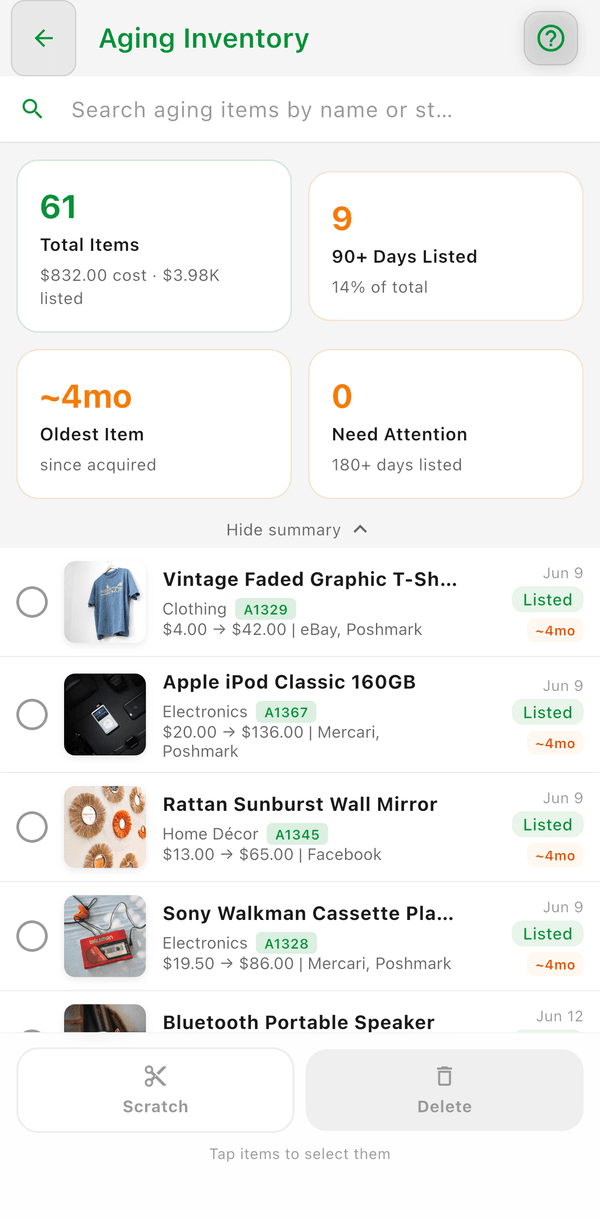
Aging is measured in days listed. The metric tiles at the top show:
- Total Items -- with the total cost and list value of your active inventory
- {N}+ Days Listed -- how many listed items have passed your Coach pace threshold, and what percentage of the total that is
- Oldest Item -- the number of days since your oldest active item was acquired
- Need Attention -- items listed past a second, longer threshold
The thresholds come from your Coach pace: 90 and 180 days for online resellers, 180 and 270 days for booth-style sellers. Below the tiles, your active (listed and unlisted) items are listed oldest first with an age badge, and you can search them by name or stock number.
How to Access It
- Go to Tools > Aging -- the card is captioned "Listed {N}+ days with no sale"
- If you don't see the card, turn it back on under Settings > Feature Visibility
Taking Action
For each aging item, consider:
- Lower the price -- Reduce your expected sale price to move it
- Try a different platform -- Some items sell better in different places
- Bundle it -- Combine with similar items for a lot sale
- Donate or discard -- Free up space and take a tax deduction
Select items on the Aging Inventory screen to Scratch or Delete them in bulk.
Good to Know
- The longer an item sits, the more your money is locked up in unsold inventory
- Check this report weekly to stay on top of aging items
- Items leave the report once they sell or are scratched or donated
- Unlisted items sitting 30+ days are a different problem -- that is the Death Pile, which has its own counter on the Home dashboard