 Flippd Help
What is the Death Pile and how do I manage aging inventory?
The Death Pile is the group of Unlisted items whose Date Acquired is more than 30 days ago. These items need attention because they're tying up money without earning anything.
How Items End Up in the Death Pile
Any Unlisted item whose Date Acquired is more than 30 days ago is in the Death Pile. The 30 days count from the acquisition date, not from the day you added the item to Flippd -- an item added today with a Date Acquired two months back is in the Death Pile immediately. Once you list the item, it leaves the Death Pile.
Viewing Your Death Pile
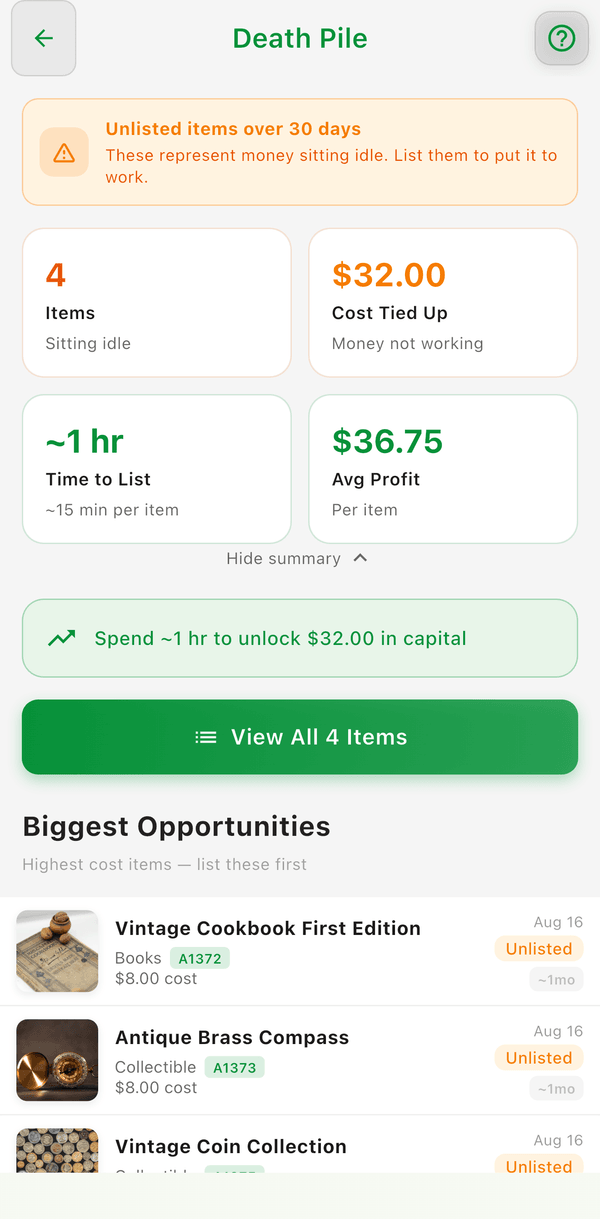
- Tap the Death Pile counter on the Home dashboard
- Or go to Tools > Death pile (under Needs attention)
You'll see all aging items with how long they've been sitting, plus the total cost tied up in them and an estimated time to work through them (about 15 minutes per item). Rows have the same swipe actions as the Inventory list: swipe right for Listed, Sold, or Dupe; swipe left for Scratch or Delete.
What to Do with Death Pile Items
- List it -- Post it on a selling platform to start earning
- Reprice it -- Lower your expected price to move it faster
- Try a different platform -- Some items sell better on certain platforms
- Take better photos -- Good photos make items sell faster
- Donate or discard -- If it's not worth the space, let it go
Hiding the Death Pile
If the Death Pile isn't relevant to your business (for example, if you sell from a booth or retail store where items are always on display), you can hide it entirely:
- Go to Settings > Feature Visibility
- Toggle Death Pile off
This removes the Death Pile counter from your Home dashboard and hides the Death Pile screen from Tools. Your items still age in the background, so you can re-enable it anytime.
Good to Know
- The Death Pile counter on your Home dashboard gives you a quick health check
- Regularly clearing your Death Pile keeps your inventory lean and your money working
- Use the Inventory Aging report for a detailed breakdown of how long items have been sitting
- If you don't see the Death Pile on your dashboard, check Settings > Feature Visibility to make sure it's enabled