 Flippd Help
What is sell-through rate and how do I improve it?
Sell-through rate (STR) measures how much of everything you've tracked has actually sold, as a percentage. A higher sell-through rate means your inventory is moving rather than piling up.
How It's Calculated
Sell-Through Rate = Items Sold / (Items Sold + Items Listed + Items Unlisted) x 100
Flippd calculates it across all of your inventory, not per month. For example, if you have sold 30 items and 70 items are still in your inventory (listed or unlisted), your sell-through rate is 30%.
Where to Find It
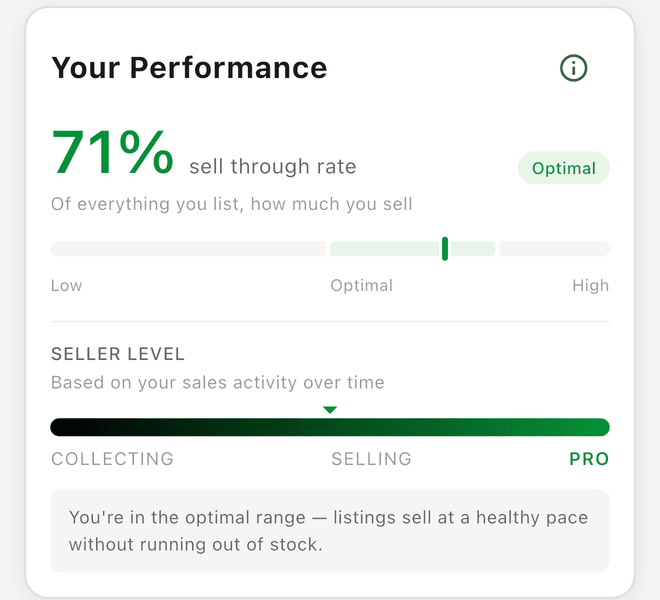
- On the Home dashboard in the Your Performance card, which shows your rate with a Low, Optimal, or High zone and a seller level (Collecting, Selling, or Pro)
- Ask the Coach "What's my sell-through rate?"
If the card is hidden, turn on Performance Card under Settings > Feature Visibility.
How to Improve Your Sell-Through Rate
- Price competitively -- Use Price Comparison (Tools > Price lookup) to check market rates
- Take better photos -- Clear, well-lit photos sell items faster
- Write detailed titles -- Include brand, size, color, and condition
- Cross-list -- Post items on multiple platforms for more visibility
- Reprice regularly -- Lower prices on items that haven't sold in 30+ days
- Source better -- Focus on categories that have sold well for you
Good to Know
- The counts behind the card follow the year filter at the top of the app, while the Death Pile count is all-time. Set the year filter to All to see your true all-time sell-through rate.
- The Your Performance card rates you against bands set by your Coach pace: for online resellers, below 50% is Low, 50-80% is Optimal, and above 80% is High (you may be underpricing or under-listing); patient sellers such as booths and estate sales get a lower 30-60% optimal range
- Your seller level is discounted by the size of your Death Pile, so items sitting unlisted for 30+ days pull it down
- Track STR over time to see if your sourcing and pricing strategies are improving