 Flippd Help
What can I do in the Flippd web version?
Flippd is available on the web at app.getflippd.com. The web version gives you access to your inventory, reports, and most features from any browser on your computer or tablet. Your data syncs automatically between web and mobile.
Accessing the Web Version
- Go to app.getflippd.com in any modern browser (Chrome, Safari, Firefox, Edge)
- Sign in with the same account you use on mobile
- Your inventory, sales, expenses, and reports are all there
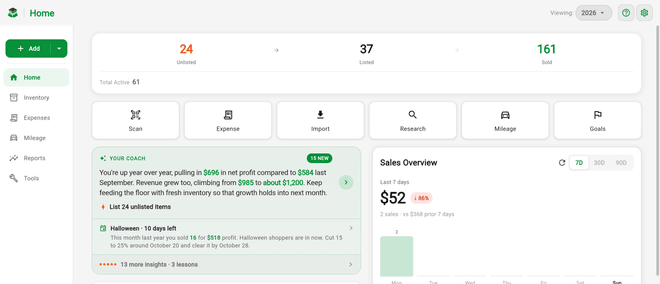
What's Available on Web
The web version includes nearly all the same features as the mobile app -- inventory, sales, reports, expenses, goals, the Profit Calculator, search and filters, bulk edit, import/export, and settings all work the same way in the browser.
Mobile-Only Capabilities
A few things rely on your phone's hardware or background services and aren't available in the browser:
- Mileage auto-tracking -- Auto-tracked trips stay on your phone for privacy and can only be viewed and classified in the mobile app. Manual mileage entries can still be added and viewed on web.
- Push notifications -- Reminders and alerts that pop up outside the app are mobile-only
- In-app camera capture -- Taking new photos or receipt scans directly with the camera. On web you can still upload existing photos and receipts from your computer.
Scanning on Web
QR and barcode scanning does work on the web version:
- Handheld scanner -- A USB or Bluetooth QR scanner works great on web. Tap the inventory search box, then scan an item's Flippd QR code and it opens automatically. See How do I use QR codes to find items and scan storage locations?.
- Browser camera -- The in-app camera scanner also works in modern browsers that allow camera access.
Tips for Using the Web Version
- Larger screen -- The web version takes advantage of wider screens, making inventory management and reports easier to browse
- Keyboard shortcuts -- Use your keyboard for faster data entry when adding items. Tap the ? help button and choose Keyboard Shortcuts to see the full list.
- Always up to date -- The web version always runs the latest version automatically, no updates needed
- Multiple tabs -- Open reports in one tab and inventory in another
Good to Know
- Data syncs in real time between web and mobile -- changes on one appear on the other
- You need an active internet connection to use the web version
- Your subscription works across all platforms (iOS, Android, and web) -- a mobile subscription is honored on web at no additional cost, and web-only subscriptions are billed through Stripe
- Sign in with the same method you used to create your account (Apple, Google, or email)