 Flippd Help
What is the Scratch Pile and how do I scratch an item?
The Scratch Pile is where items go when they're no longer for sale -- whether they're damaged, kept for personal use, lost, or removed for any other reason. Scratching an item removes it from your active inventory while keeping a record of the cost for your reports.
How to Scratch an Item
- Open the item you want to scratch
- Tap the ⋮ (three dots) menu in the bottom bar
- Select Scratch
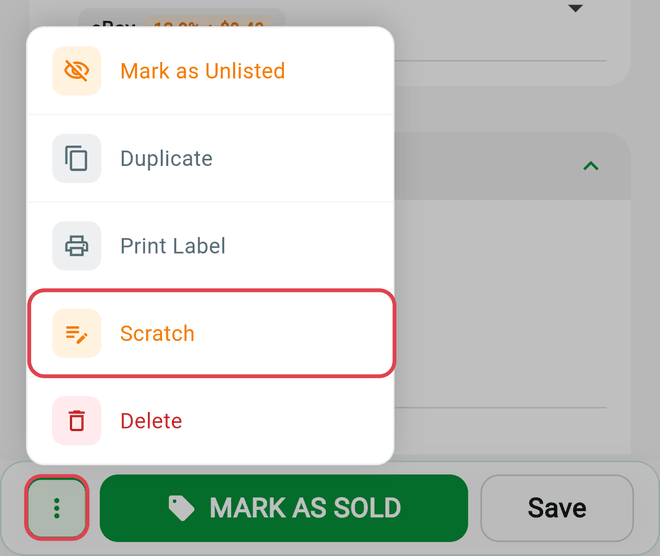
The item is immediately moved to your Scratch Pile. For a faster route, swipe left on an item in the inventory list and tap Scratch.
What Happens When You Scratch
- The item is removed from active inventory counts (Unlisted, Listed totals)
- The item's cost is tracked separately as Cost of Goods Scratched in your reports
- The item is not deleted -- it stays in your account for record-keeping
- Date Scratched is recorded for accurate tax reporting, and you can edit it on the item if needed
Viewing Your Scratch Pile
- Filter your inventory by Scratch using the status chip at the top of the Inventory screen
- Or see your Scratch Pile totals in Reports
Scratched items show the date they were scratched.
When to Scratch
Use the Scratch Pile for items that are leaving your sellable inventory:
- Damaged -- Broken, stained, or otherwise unsellable
- Keeping -- You decided to keep it for personal use
- Lost -- Can't find it or it went missing
- Other -- Any reason the item is no longer for sale
Flippd doesn't ask you for a reason -- this list is just guidance. If you want to keep track of why, add it to the item's notes.
Good to Know
- Scratch vs. Delete -- Scratching keeps the item in your records for reporting and tax purposes. Deleting removes it from your records -- you can restore it for 3 days, then it's gone for good. Use scratch when you want to preserve the cost history.
- Tax reporting -- Scratched items are recognized as a loss in the month they were scratched, not the month they were acquired. This matches standard inventory accounting rules.
- You can undo a scratch -- Open the scratched item, tap the ⋮ menu, and choose Restore to put it back in active inventory -- there's no separate Unscratch. The same menu also offers Delete.
- Scratch date updates -- Changing the Date Scratched on an item correctly keeps the item in Scratch status. The updated date is reflected in your reports.