 Flippd Help
How do I manage my Flippd subscription through Apple?
If you subscribed to Flippd through the App Store on your iPhone or iPad, Apple handles all billing. You manage your subscription through Apple's settings, not inside Flippd.
Viewing Your Subscription
- Open Settings on your iPhone or iPad
- Tap your name at the top (Apple ID)
- Tap Subscriptions
- Find Flippd in the list
- You'll see your current plan, price, and renewal date
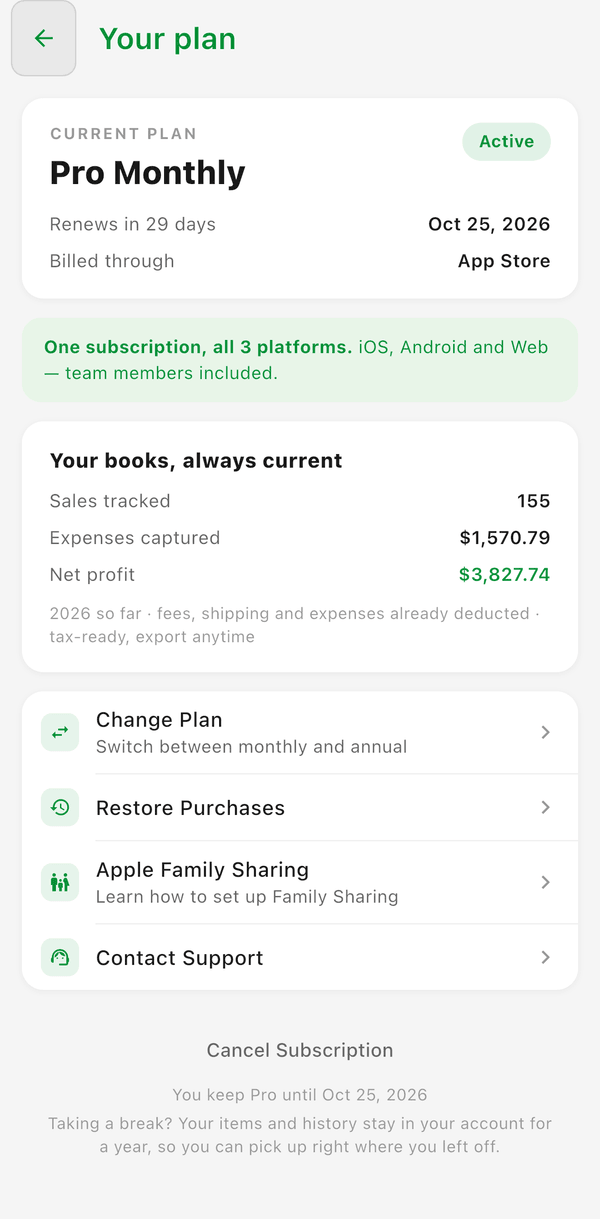
You can also see your current plan inside the app: open Settings (gear icon, top right) and tap Subscription in the Account section. The Subscription screen shows Pro Monthly or Pro Annual, Renews on (or Ends on) with the date, and Billed through: App Store.
Upgrading or Downgrading
- Go to Settings > Apple ID > Subscriptions > Flippd
- Tap the plan you want to switch to
- Confirm the change
- Upgrading takes effect immediately. You get prorated credit for the remaining time on your old plan.
- Downgrading takes effect at the end of your current billing period.
Canceling Your Subscription
You can start from inside Flippd: on Settings > Subscription, tap Cancel Subscription at the bottom, answer the short question about why you're leaving, and confirm. Flippd then opens Apple's subscriptions page, where the cancellation is actually completed. Or go there directly:
- Go to Settings > Apple ID > Subscriptions > Flippd
- Tap Cancel Subscription
- Confirm the cancellation
After canceling:
- You keep access until the end of your current billing period
- Your data is preserved -- nothing is deleted
- You can resubscribe at any time to regain access
- You revert to the free tier features when the billing period ends
Requesting a Refund
Apple handles all refunds for App Store purchases. Flippd cannot process refunds for Apple subscriptions.
- Go to reportaproblem.apple.com
- Sign in with your Apple ID
- Find the Flippd charge
- Select the reason and submit your request
Apple typically responds within 48 hours.
Family Sharing
If you have an Apple Family Sharing group, your Flippd subscription can be shared with family members:
- The primary subscriber pays, and up to 5 family members get access
- Each family member gets their own separate Flippd account and data
- Family members don't need to subscribe individually
To enable Family Sharing for Flippd, the subscription must be purchased by the family organizer, and Family Sharing must be enabled for subscriptions in your Apple Family settings.
Troubleshooting
Subscription Not Recognized
If Flippd doesn't recognize your subscription:
- Make sure you're signed into Flippd with the same Apple ID used to purchase
- Go to Settings > Subscription and tap Restore Purchases
- Wait a moment for Apple to verify your subscription
- If still not working, sign out and sign back in
Charged After Canceling
Apple bills at the start of each period. If you were charged after canceling, check:
- When you canceled -- if it was after the renewal date, the charge is for the period before cancellation
- Whether the cancellation was confirmed -- go to Settings > Subscriptions to verify
Subscription Shows on Wrong Device
Your subscription is tied to your Apple ID, not your device. Sign into any Apple device with the same Apple ID and the subscription follows you. It also works in Flippd on Android and the web once you sign in there -- one subscription covers all platforms, so there is nothing to re-subscribe to.
Good to Know
- Apple takes a 15-30% commission on App Store subscriptions, which is why some subscription prices may differ from web pricing
- Annual plans offer a discount compared to monthly billing
- Apple sends receipt emails for each charge -- check your Apple ID email
- You can manage subscriptions from any Apple device or at appleid.apple.com