 Flippd Help
How do I search, filter, and sort my inventory?
Use the search bar at the top of the Inventory screen to find items by title, stock number, notes, and more. Use filters and sort options to narrow results.
Searching
Type in the search bar to find items by:
- Title -- Any word in the item name
- Notes -- Anything you wrote in the item's notes
- Stock number -- Flippd's auto-assigned number
- Category -- The item's category
- Storage location -- The name of the location the item is in
- Barcode -- The product barcode saved on the item
Platform and SKU aren't searched. To narrow by platform, use Advanced Filtering below.
Quick Chips at the Top
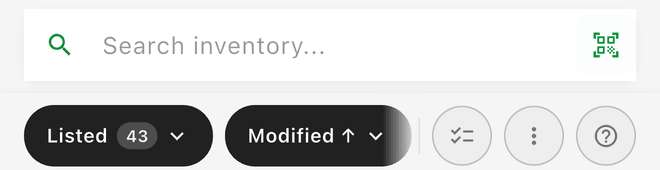
At the top of the Inventory screen, you'll see chips for quick access:
- Status chip (filter) -- Tap to filter by Active, All, Unlisted, Listed, Sold, Scratch, Death Pile (when it's shown), or Deleted. This is the only filter chip in the quick chip row -- there's no price filter chip. Each status shows a count of how many items match, so you can see at a glance how your inventory breaks down. The counts update in real time as you add, list, and sell items.
- Sort chip (not a filter) -- Tap to change the sort order. This chip changes how items are ordered, not which items appear. See Sorting below for the available options.
- Active filter badges -- When filters are active (from the Status chip or Advanced Filtering), they appear as dismissible chips. Tap the X on any chip to remove that filter, or tap Clear All to reset everything.
To filter by anything other than status (category, platform, location, etc.), use Advanced Filtering below.
Advanced Filtering
Tap the filter icon for more detailed filtering:
- Category -- Clothing, Electronics, etc.
- Listed On -- The platform(s) an item is listed on
- Sold On -- The platform an item sold on
- Status -- Unlisted, Listed, Sold, and so on
- Location -- Where items are stored
- Source -- Where you sourced the items
- Uncategorized -- Only items with no category
There's no date-range filter on the Inventory screen; sort by a date instead, or use the date basis on the export screen (see below).
Sorting
Sort your inventory by:
- Last Modified -- Most recently edited first
- Date Created -- When the item was added to Flippd
- Date Acquired -- When you sourced the item
- Date Listed -- When the item went up for sale
- Date Sold -- When the sale was recorded
- Title -- Alphabetical
Tap the same sort option twice to toggle between ascending and descending order. The arrow on the Sort chip shows the current direction: ↑ is ascending (A to Z, or oldest first) and ↓ is descending (Z to A, or newest first).
Good to Know
- Combine search with filters for precise results (e.g., search "Nike" + filter by "Listed")
- Status counts on chips give you a quick inventory health check without opening reports
- Clear all filters to see your entire inventory
- Scan a QR code to instantly find items by storage location
- If you can't find an item, check that no filters are active
- Tapping a category or platform in Reports also filters the Inventory screen
- Inventory-screen filters don't carry over to exports, but the export screen (Tools > Import / export) has its own Advanced Filters where you can choose statuses and which date the year applies to (acquired, sold, listed, or either)