 Flippd Help
How do I use Flippd for Poshmark, Mercari, and Depop clothing reselling?
Add each piece once with photos, cost, and a Storage Location, mark it Listed with every platform it's on, and when it sells tap Sold and pick the platform so the right fee applies. Reports then show which platform and category earn the most, and the Death Pile catches pieces that stopped moving.
Set Up
- Check your platforms and fees. Go to Settings > Customize Data > Platforms. Poshmark, Mercari, Depop, and Vinted are built in with their fee structures (Poshmark uses its real tier: $2.95 under $15, 20% at $15 and up); add anything else you use. Accurate fees mean accurate profit.
- Create storage locations for your closet system. "Bin 1" through "Bin 12", or by size or category. Print a QR label for each bin so you can scan it and see what's inside.
- Add your sources: "Thrift Store", "Goodwill Bins", "Wholesale", "Own Closet". Filtering Inventory by Source later tells you where your best inventory comes from.
- Hide what you won't use under Settings > Feature Visibility (Storefronts, for most closet sellers).
Listing Routine
- Add the item with a couple of photos. AI identify reads the label and suggests the title (brand first) and category.
- Enter the cost you paid. Bought a bag of clothes for one price? Log a bulk purchase and split the cost across the pieces.
- Mark it Listed and tick every platform you cross-list on under Listing Platforms. The status flips once no matter how many closets it's in. If you also use eBay sync, this keeps an ended eBay listing from flipping the item to Unlisted while it's still listed elsewhere.
- Bin it and set the Storage Location.
When It Sells
Open the item, tap Sold, enter the sale price, and choose the platform it sold on. Flippd applies that platform's fee, so the profit is right. Add the shipping cost if you paid it. Delist it from the other platforms as you normally would; Flippd doesn't touch your listings.
Weekly Check-In
- The Platform Performance chart in Reports answers the eternal question: is Poshmark or Mercari actually paying better after fees?
- Category Performance shows what to hunt for next thrift run, and Source Performance shows which thrift stores pay off.
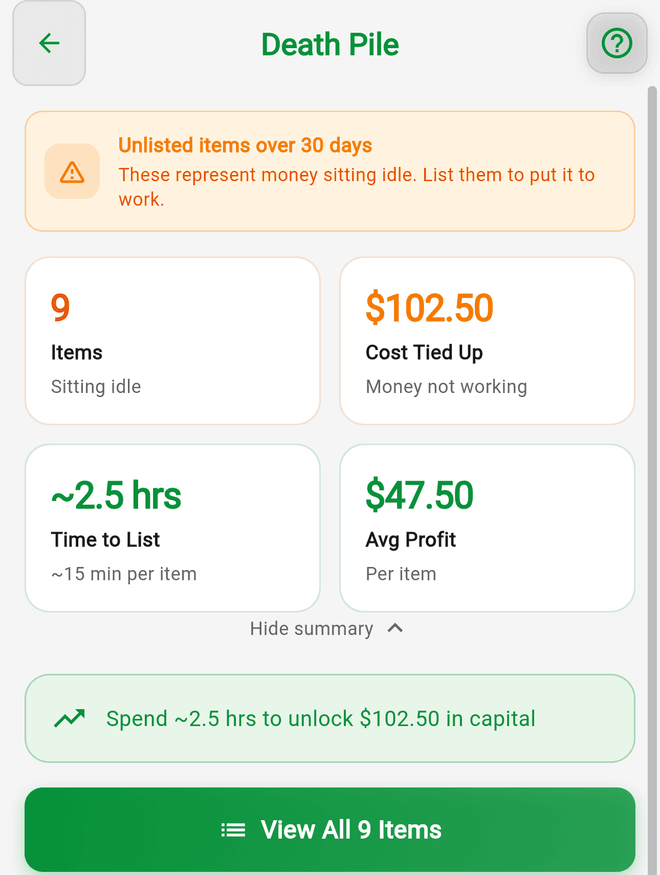
- Tools > Death pile lists pieces unlisted for 30+ days. Relist, drop the price, or bundle.
- Tools > Aging shows listed pieces that have been sitting past your pace.
- Keep a monthly listing Goal and let the Coach hold you to it.
Features You Can Skip
- Storefronts are for in-person selling. Create one only for a closet sale or pop-up.
- eBay sync (a Pro feature) only if eBay is one of your closets. Nothing syncs from Poshmark, Mercari, or Depop; sales there are recorded with a tap.
Good to Know
- Poly mailers, tissue, tape, and shipping labels you pay for go in Expenses; scan the receipts.
- The drive to the thrift store is a business trip. Turn on Automatic trip tracking under Tools > Mileage.
- Share a great flip with a Share Flip image for your closet's socials.
Related Articles
- What are the selling fees for eBay, Poshmark, Mercari, and other platforms?
- How do I mark an item as listed for sale?
- How do I record a sale and track my profit?
- How do I see which categories and platforms are most profitable?
- What is the Death Pile and how do I manage aging inventory?
- Does Flippd list my items on eBay, Whatnot, Poshmark, or Mercari?