 Flippd Help
Where do I find the SKU field on an item?
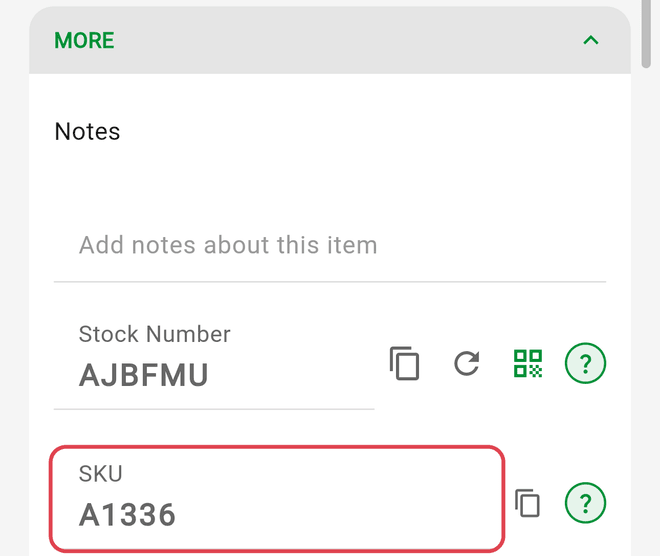
To find the SKU field on an item detail screen, scroll near the bottom of the screen and tap the collapsible MORE section to expand it.
Step-by-Step
- Open the Inventory tab
- Tap the item to open its detail screen
- Scroll toward the bottom of the screen
- Tap MORE to expand the section
- Locate the SKU field inside the expanded section
- Tap Save in the bottom action bar if you make any changes
Good to Know
- The MORE section is collapsed by default for new and existing items to keep the detail screen uncluttered. If the SKU field does not appear, it has not disappeared—expanding MORE will reveal it.
- Flippd saves your expanded or collapsed preference on your device, so once you expand the MORE section, it stays open for other items you view.
- If you have auto-generation turned on in Settings > SKU Settings, new items receive an auto-generated SKU automatically, and a refresh icon appears next to the field to regenerate it.
- If Allow manual edit is disabled in Settings > SKU Settings, the SKU field is read-only.
- Tap the copy icon next to the SKU field to copy the identifier to your clipboard.