 Flippd Help
How do I set up and use SKU numbers for my inventory?
To configure SKU settings, go to Settings > SKU Settings. To view or generate a SKU on an item, open the item in Inventory and expand the collapsible MORE section near the bottom.
What Is a SKU?
A SKU (Stock Keeping Unit) is a unique identifier for each inventory item. Flippd can auto-generate SKUs or you can enter your own.
Configuring SKU Settings
- Go to Settings (tap the gear icon in the top right)
- Tap SKU Settings
- Choose your preferences:
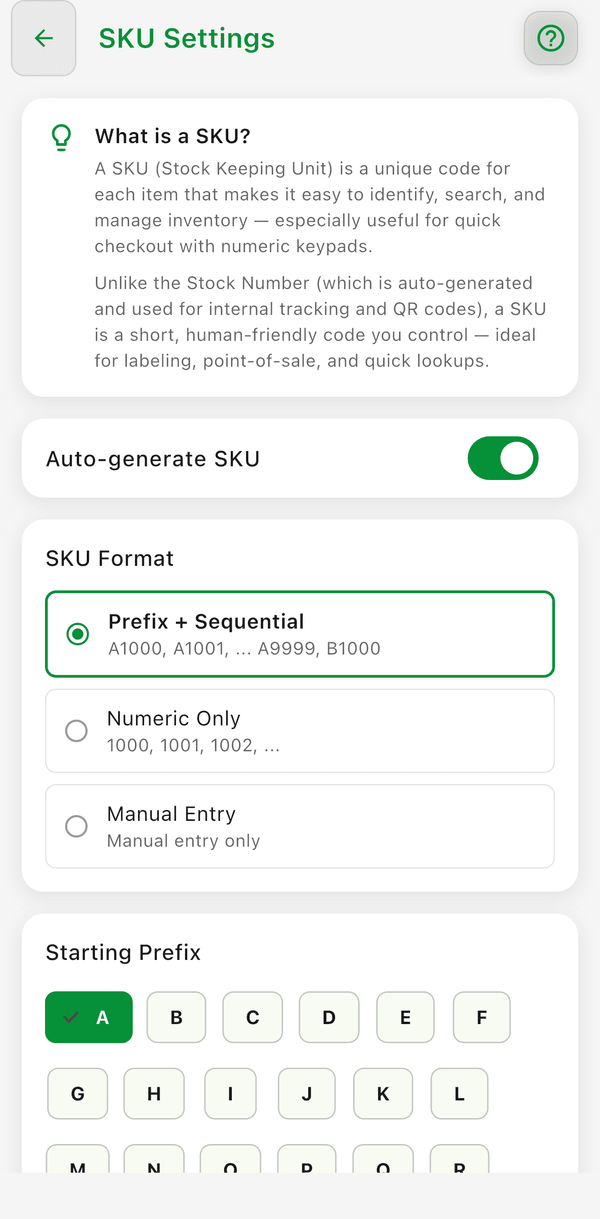
- Auto-generate SKU -- Flippd automatically assigns a SKU when creating a new item
- SKU Format -- Prefix + Sequential, Numeric Only, or Manual entry only
- Starting prefix -- the letter that leads each SKU (for Prefix + Sequential)
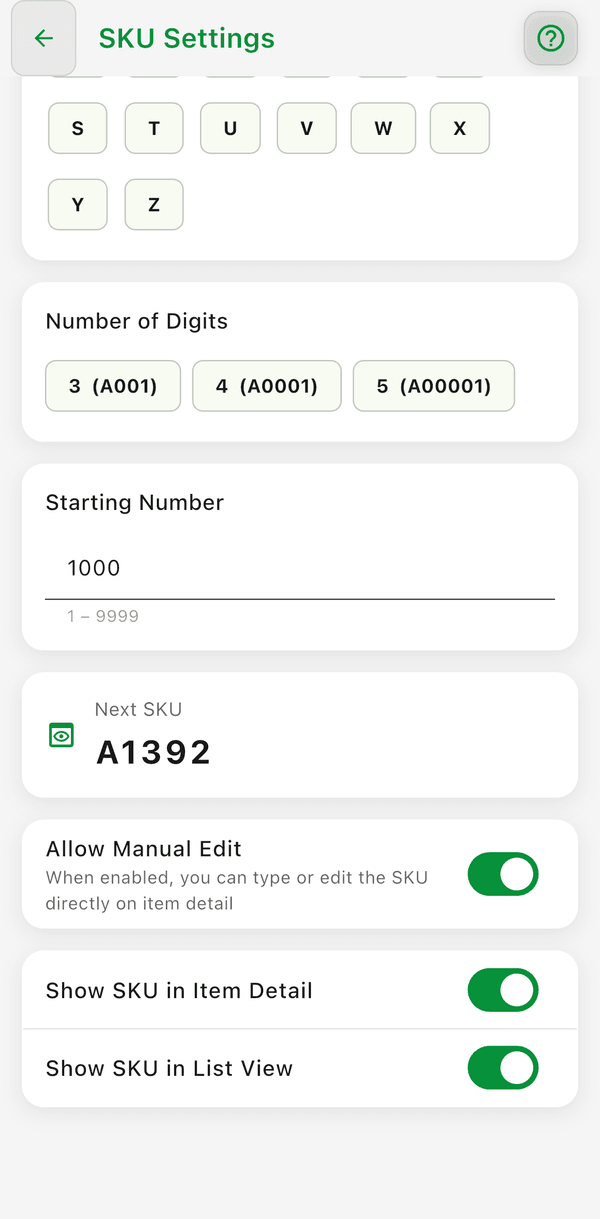
- Number of digits and Starting number -- how long the number part is and where the sequence starts; the Next SKU preview shows what the next item will get
- Allow manual edit -- lets you type or edit the SKU directly in the item details
- Show SKU in item detail and Show SKU in list view -- controls where SKUs are displayed
How to Generate or Regenerate a SKU on an Item
If an item does not have a SKU, or if you want to assign a new one:
- Open the item in the Inventory tab
- Scroll near the bottom of the item detail screen and tap MORE to expand the section
- Find the SKU field
- Tap the refresh icon next to the SKU field to generate the next SKU
- If the item already has a SKU, Flippd asks Replace SKU? -- tap Regenerate to confirm
- Tap Save in the bottom action bar
Why Didn't My SKU Auto-Generate?
If a SKU was not assigned automatically, check the following:
- The item was created before auto-generation was enabled: Flippd only auto-generates SKUs when creating a new item. Turning on auto-generation in Settings does not retroactively assign SKUs to existing items. You can generate one on any existing item by opening it, expanding the MORE section, and tapping the refresh icon next to the SKU field.
- Auto-generate SKU is turned off: Go to Settings > SKU Settings and verify that the Auto-generate SKU switch is turned on.
- SKU Format is set to Manual entry only: In Settings > SKU Settings, choose Prefix + Sequential or Numeric Only. Auto-generation does not run when the format is set to Manual entry only.
- The item already has a SKU: Flippd never automatically overwrites an existing SKU. Tap the refresh icon next to the SKU field in the MORE section if you want to replace it.
Using SKUs
Once configured, SKUs appear:
- In the collapsible MORE section on item detail screens
- In search results (you can search by SKU)
- On printed labels (when your template includes an SKU element)
- In CSV exports
Good to Know
- SKUs are different from stock numbers -- stock numbers are Flippd's internal auto-assigned IDs, while SKUs are your custom identifiers
- You can search your entire inventory by SKU for fast item lookup
- To print SKUs on labels, add an SKU element to your label template in the label editor (Tools > Labels > Manage Templates)
- When regenerating an existing SKU, any labels previously printed with the old SKU will need to be reprinted
- The refresh icon only appears next to the SKU field if Auto-generate SKU is enabled and the format is not set to Manual entry only