 Flippd Help
What is Data Health and how do I fix the records it flags?
Data Health scans your inventory, expenses, and mileage for the mistakes that quietly skew your numbers: duplicates, missing costs, bad dates, and blank fields. Open Tools > Records to fix, run a scan, and work through each check with Fix, Open item, Merge…, or Ignore. Nothing changes until you act on a record.
Step-by-Step
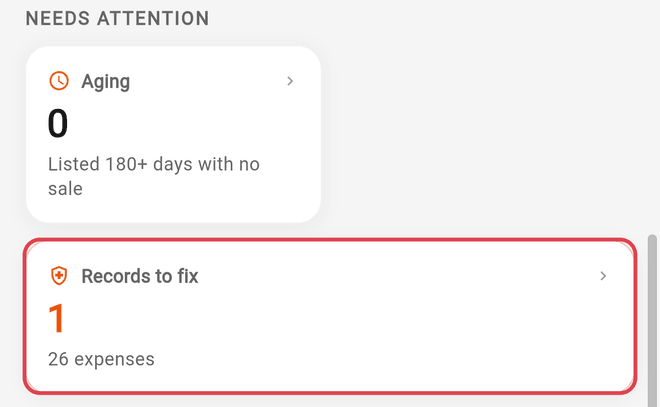
- Open Tools and tap Records to fix. Before your first scan it reads "Not checked yet" with a Scan now button; afterwards it shows how many records need attention
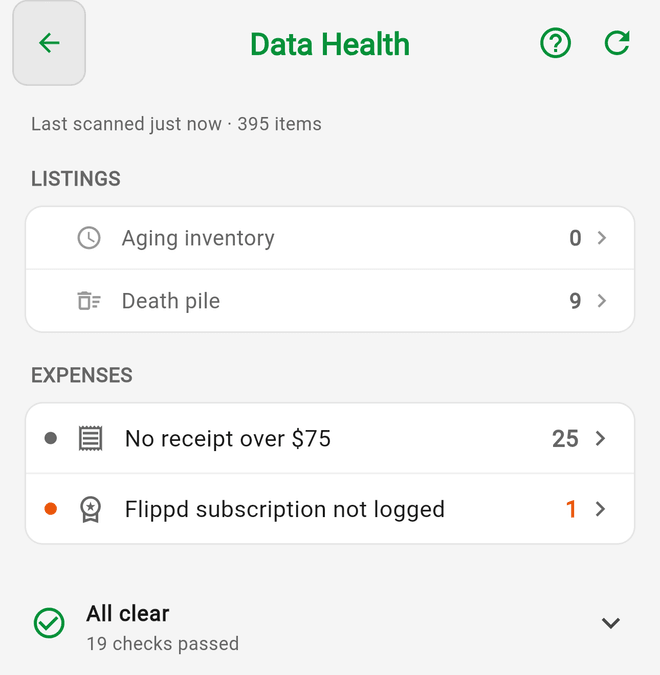
- On your first visit, read the intro and tap Run the first scan. The Data Health screen scans each time you open it (a scan from the last 10 minutes is reused). Tap Scan again to force a fresh one
- Findings are grouped under MONEY, LISTINGS, DATA, EXPENSES, and MILEAGE. Tap a check to see the affected records and why it matters
- Fix a record:
- Fix opens a sheet to fill in the one missing field (Cost, Sale price, Sold on, Date acquired, and so on), then Save
- Open item takes you to the full editor for things one field can't solve: no photos, missing titles, duplicate or unlinked expenses, trips with no deduction
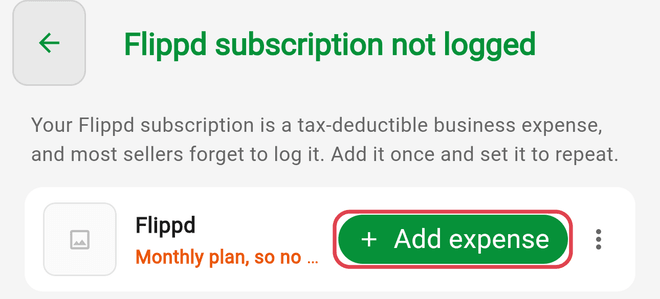
- Add expense opens a prefilled expense for "Flippd subscription not logged"
- Merge… handles duplicate groups (below)
- Where you see Fix all (N), one value applies to every record in the list after you confirm Apply to N items. This is offered for Sold with no platform, Listed with no platform, No acquired date (each item's acquired date becomes the day it was added to Flippd), and Uncategorised expenses
- If a finding isn't really a problem, tap Ignore (or Not a duplicate on a group). It moves under Show ignored (N) at the bottom, where Restore brings it back. Ignored records stay hidden until that record changes
Merging duplicates
Exact duplicates share a barcode, SKU, or marketplace listing; Likely duplicates share a title plus the same source, date, or cost. Tap Merge…, and on the Merge duplicates sheet choose Keep this one -- Flippd notes why each is a good choice (marketplace listing, sale recorded, photo count, oldest). Tap Merge into the item you're keeping: the others are removed and their photos, notes, and listing links move to it. An Undo appears right after, and a merge can be undone for 30 days.
What the scan checks
- Inventory: No cost recorded, Sold with no sale price, Sold with no platform, No acquired date, Dates out of order, Listed with no platform, Quantity ran out, Listed with no photos, Exact duplicates, Likely duplicates, Missing titles
- Expenses: Uncategorised expenses, Expense dated in the future, Duplicate expenses, Expenses not linked to items, No receipt over $75, Flippd subscription not logged
- Mileage: Trips with no purpose, Trips with zero miles, Trip dated in the future, Trips with no deduction
Good to Know
- Nothing is automatic; every change is one tap on a specific record.
- Dates out of order follows Flippd's date rules: acquired within the last 20 years, listed and sold on or after acquired, sold on or after listed, nothing in the future. The fix sheet is prefilled with the nearest valid date.
- Long lists are capped. You may see "Showing the first N. Scan again after fixing these."
- When everything passes you'll see "Everything looks good" with shortcuts to Aging inventory and Death pile.