 Flippd Help
How do I run a part-time reselling side hustle with Flippd?
With limited hours, the goal is zero double entry. Add items the moment you buy them, let eBay sync record sales if eBay is your channel, keep expenses and mileage flowing in automatically, and let the Coach and Reports do the thinking so the time you do have goes into sourcing and listing.
The Fifteen-Minute Setup
- Platforms and fees under Settings > Customize Data > Platforms: keep only what you use.
- Connect eBay under Settings > Integrations if you sell there (a Pro feature; the free plan gets a read-only 90-day preview). Sales then record themselves.
- Turn on Automatic trip tracking under Tools > Mileage. Weekend sourcing runs become deductions without effort.
- Two or three Storage Locations so listed items are findable when they sell at 11pm on a Tuesday.
- Hide the rest under Settings > Feature Visibility: Storefronts, labels, invoices, whatever you won't touch.
The Weekly Rhythm
- Sourcing day: add finds on the spot with a photo or barcode; enter cost while it's fresh. Box lots become a bulk purchase.
- Listing night: mark items Listed as you post. Use the Death Pile as your to-do list; it's every item you've had 30+ days without listing.
- Sales: eBay sales sync in. Elsewhere, tap Sold and pick the platform.
- Receipts: scan them into Expenses when you get home so shoebox season never happens.
Keeping Score
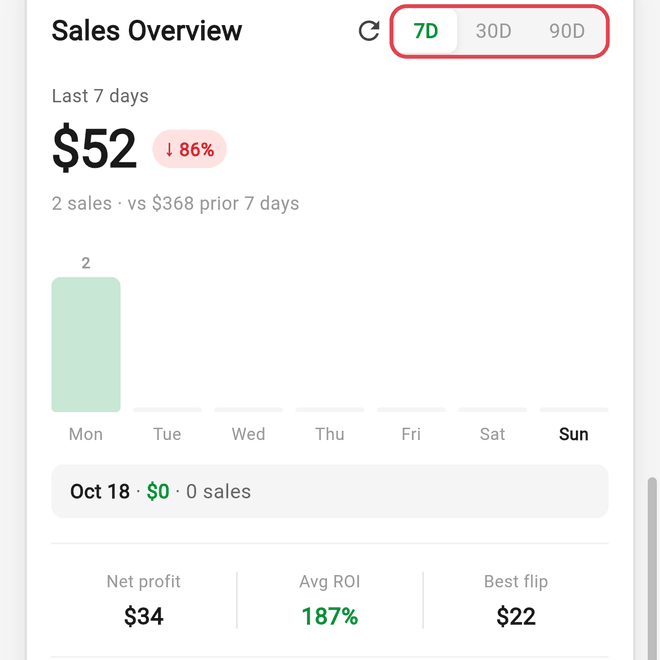
- The Home screen shows your net profit for the last 7, 30, or 90 days at a glance.
- The YTD tab in Reports shows whether the hustle is on pace, and the Compare tab shows growth.
- Set a monthly sales Goal (or a custom goal with a target date) and let the Coach's daily briefing keep you honest.
Tax Time
Because expenses, mileage, and sales already live in Flippd, tax prep is an export: the Excel workbook from Tools > Import / export covers your sales, expense, and mileage data, and Reports > Tax Reports prints the Mileage Log PDF. Invite your accountant as a read-only Viewer under Settings > Users if they'd rather look for themselves (inviting requires Pro).
Features You Can Skip
- Storefronts unless you occasionally do a market or yard sale.
- Team members, unless a spouse or friend helps, in which case invite them so you stop texting each other spreadsheets.
Good to Know
- Watch the free-plan caps (20 items, 25 expenses and 30 trips a month). A side hustle usually outgrows them in the first month or two.
- Auto-tracked trips live on your phone; the web app can't show them, so review mileage in the mobile app.
- Keep hobby stuff out of the business account, or run a second account and switch between them from Settings.