 Flippd Help
How do I use Flippd for garage sale, yard sale, and thrift flipping?
Add finds in the driveway with a photo or barcode scan, log box lots and bundle deals as bulk purchases so every item gets a real cost, and let Mileage track your Saturday route automatically. Then list online and let Reports tell you which sales, categories, and neighborhoods actually pay off.
While You're Out Sourcing
- Add each find before the next stop. Tap Add, snap a photo (AI identify fills in title and category) or scan the barcode. Enter what you paid and the Source; the built-in sources Garage Sale, Thrift Store, and Estate Sale are ready under Settings > Customize Data > Sources.
- Not sure it's worth it? Open Price lookup to see what similar items are listed for on eBay (with a link to sold results), or the Profit calculator to see what's left after fees and shipping before you hand over cash.
- Paid one price for a box of stuff? Create a bulk purchase for the box, add the items to it, and split the cost across them. A $5 mystery box becomes five items with honest cost basis.
- Keep the receipt when you get one. Attach it as proof of purchase on the item (turn on Proof of Purchase Linking under Settings > Inventory Preferences first) or scan it into Expenses. A thrift receipt can also be read straight into items with Read receipt (3 receipt scans a day on the free plan).
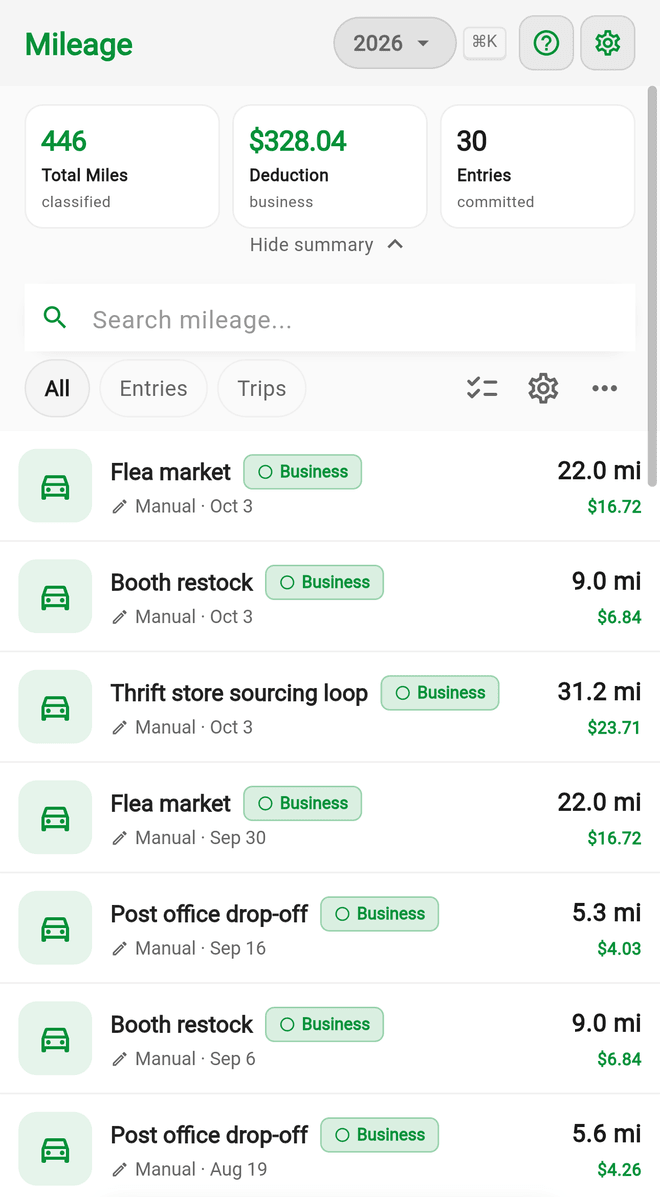
Automatic trip tracking under Tools > Mileage logs the drive between sales in the background, so the deductible miles add up without opening the app. With Link Inventory to Trips on (it is by default), you can attach the day's finds to the trip for audit-proof mileage records.
When You Get Home
- Drop everything into a Storage Location ("To List", "Photo Queue", or a numbered bin) so nothing gets lost in the pile.
- Mark items Listed as you post them. Sell on eBay? Connect eBay sync (a Pro feature) and it records the sale for you when it happens. Elsewhere? Tap Sold on the item and pick the platform.
- Print a QR label for anything going into long-term storage so you can find it when it sells.
Sharpening Next Saturday
- The Category Performance chart in Reports shows which kinds of finds make money and which just take up shelf space.
- The Source Performance chart in Reports (or filtering Inventory by Source) shows whether garage sales, thrift stores, or estate sales are the better hunt.
- Tools > Death pile surfaces finds still Unlisted 30+ days after you bought them. Clear it weekly.
- Set a monthly listing Goal (or a custom goal with a target date) and let the Coach cheer you toward it.
Features You Can Skip
- Storefronts are for selling in person. Skip them unless you hold your own yard sale, in which case the Garage sale venue type makes a nice browsable catalog for a weekend.
- Team members and invoices rarely matter at this stage.
Good to Know
- The free plan covers 20 items, 25 expenses a month, and 30 trips a month. A busy Saturday flipper hits the item cap fast, so plan on Pro once it clicks.
- Share your best flip with a Share Flip image straight from the item.
- Use custom fields if you like to note the sale address or the seller's name.
Related Articles
- How do I track bulk purchases and liquidation lots?
- What are all the ways to add inventory to Flippd?
- How do I use the Profit Calculator before buying an item?
- How does automatic trip detection work?
- What is the Death Pile and how do I manage aging inventory?
- How do I attach a proof of purchase or receipt to an inventory item?