 Flippd Help
How do I use Flippd for sports cards, sneakers, and collectibles?
Add pieces with a barcode scan or photo, use custom fields for grade, size, or condition, log boxes, breaks, and lot buys as bulk purchases so every card or pair has a real cost, and record partial sales when you sell part of a lot. Price with Price lookup before you buy, and use a Storefront only when you set up at a show.
Set Up
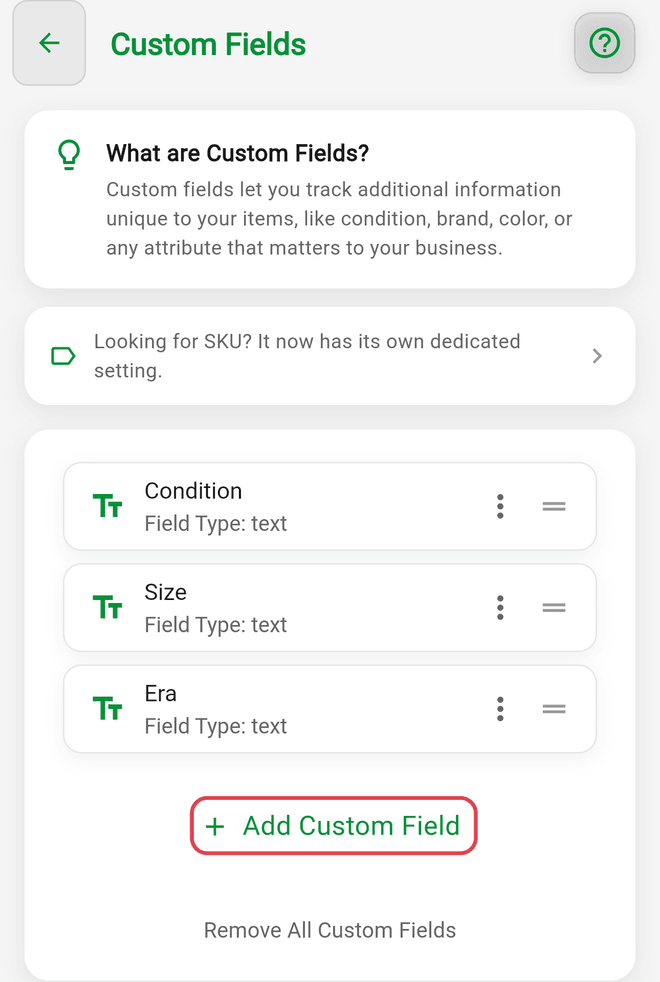
- Add custom fields under Settings > Custom Fields for what matters in your niche: grade and grader, cert number, size, colorway, condition, or set and year. They show on every item and in exports.
- Set up categories like "Baseball", "Basketball", "Pokémon", "Jordan", "Dunk", so Reports can tell you which lanes pay.
- Add your platforms. eBay, Whatnot, Mercari, StockX, and Local are built in under Settings > Customize Data > Platforms; add fees to any that don't have one, and add "Card Show" for in-person deals.
- Storage Locations that match your storage: binders, boxes, cases, or shoe shelves, each with a QR label.
Buying
- Price lookup shows current eBay asking prices with a one-tap link to sold results, so you know what a card or pair actually clears for.
- Profit calculator tells you the margin after the platform fee before you commit.
- Boxes, cases, breaks, and lot buys: create a bulk purchase for the box, add the hits as items, and split the cost. Choose Manual allocation to pin most of a box's cost on the one hit that carried it. Bought a collection for one price? Same thing. Every piece gets an honest cost basis, and the purchase shows its total ROI as pieces sell.
- Barcode quick-add turns a UPC on a sealed product or shoebox into a titled item instantly.
Selling
- eBay: connect eBay sync (a Pro feature) and sales record themselves.
- Whatnot, shows, Mercari: tap Sold on the item and pick the platform. Flippd doesn't list for you on any platform.
- Selling part of a lot (five cards from a stack of twenty): tap Sold and set Quantity Sold. The remaining quantity and cost split according to Partial Sale Handling under Settings > Inventory Preferences.
- Card shows and sneaker events: publish a Storefront with the "Other in-person venue" type for the weekend, map your show boxes to sections, and put the QR on the table. Items linked to eBay won't appear in it. Pause it when you're home.
Reviewing
- The Category Performance chart in Reports shows which sport, set, or silhouette makes money.
- Tools > Aging shows what's sitting; slabs and hyped pairs that cooled off belong in the next show box.
- Set a monthly sales Goal and follow the Coach's briefing.
Features You Can Skip
- Mileage unless you drive to shows and card shops, in which case it's worth turning on.
- Invoices unless a buyer asks.
Good to Know
- Grading fees, show tables, and supplies go in Expenses.
- Attach the purchase receipt or the grader's invoice to the item as proof of purchase (turn on Proof of Purchase Linking under Settings > Inventory Preferences first).
- Up to 8 photos per item: front, back, corners, box label.
Related Articles
- How do I add custom fields to my inventory items?
- How do I track bulk purchases and liquidation lots?
- How do I use the Profit Calculator before buying an item?
- What are Storefronts and how do I use them?
- How do I attach a proof of purchase or receipt to an inventory item?
- How do I connect my eBay account to Flippd?