 Flippd Help
How do I run a full-time, high-volume reselling business with Flippd?
At volume, the wins come from automation and structure: eBay sync for hands-off sales, bulk purchases for lot buying, a Storage Location system with QR labels so any item is findable in seconds, team members so helpers work in the same account, and Reports plus the Coach to steer what you buy next. Add a Storefront only for the physical side of the business, if there is one.
Structure
- Storage system. Under Tools > Storage locations build parents and sublocations that match your space: "Rack A" with "A1" through "A20", "Shipping Station", "Photo Queue". Print QR labels for every slot and for the items themselves, with your logo (from Settings > Business Profile) on the label template.
- SKU auto-generation under Settings > SKU Settings so every item gets a unique number you can also use as the eBay custom label. That's what keeps eBay sync matching cleanly.
- Platforms, categories, sources under Settings > Customize Data, tuned to your business with correct fee rates. Add sources for every supplier and sourcing channel.
- Custom fields for whatever you track per item: supplier order number, condition grade, lot ID.
- Team. Invite listers, photographers, and shippers as Members and your bookkeeper as a Viewer under Settings > Users. Up to 5 people per account, on the owner's subscription; inviting requires Pro.
Buying
- Lots, pallets, and collections go in as bulk purchases with cost allocated across items, so per-item profit and per-supplier ROI are real. A supplier manifest imports as a CSV (Import CSV Manifest from the purchase's Add Items chooser, up to 5,000 rows) and switches allocation to weighted by value.
- Price lookup and the Profit calculator before any significant buy.
- Sourcing miles track themselves with Automatic trip tracking under Tools > Mileage.
Selling
- eBay: connect under Settings > Integrations (a Pro feature; only the owner can connect, and members see sync status but can't connect). Listings import, sales sync, partial sales on multi-quantity listings are handled, and Flippd never touches your listings.
- Other platforms: tap Sold and pick the platform. Nothing lists for you.
- Local and wholesale buyers: turn on Invoices under Settings > Feature Visibility, then use Invoice Buyer on the sold item.
- Physical outlet (a booth, warehouse sales, shows): publish a Storefront mapped to that location so shoppers browse from a QR code. Keep it paused otherwise. Items linked to eBay never appear in it.
Running the Numbers
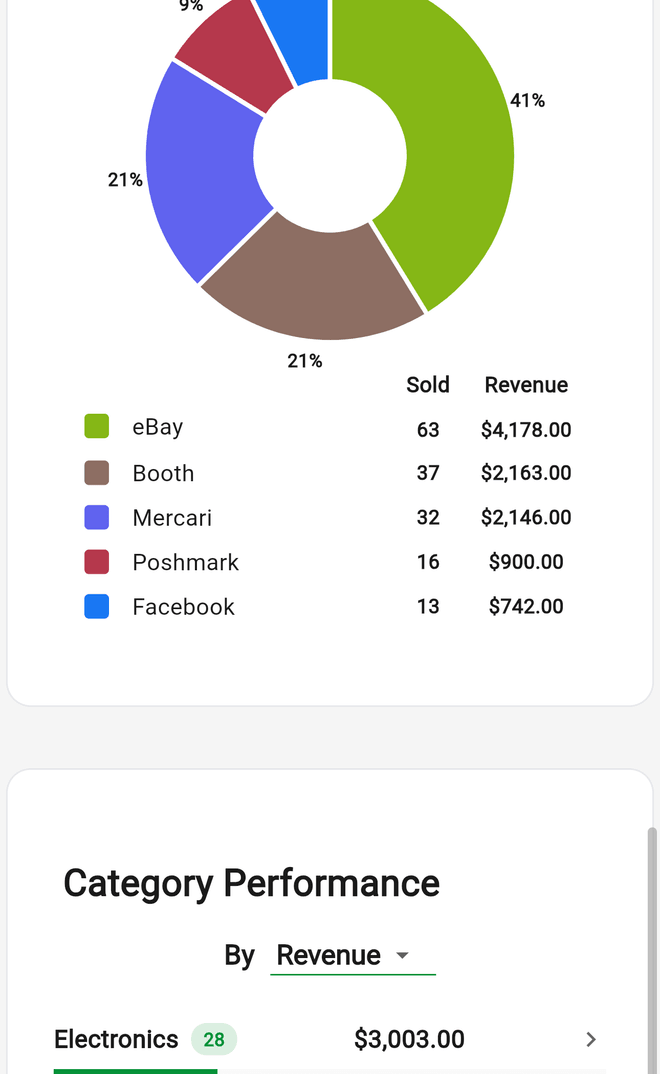
- Reports: the Platform, Category, and Source Performance charts plus the YTD and Compare tabs; sell-through on the Home Your Performance card. Check them weekly, not daily.
- Tools > Death pile (Unlisted 30+ days) and Tools > Aging (Listed past your pace) are your reprice and liquidate lists.
- Expenses: recurring entries for rent, software, and insurance; receipt scanning for everything else; Schedule C mapping so your accountant's export is ready.
- Goals for monthly sales, revenue, or listing count. The Coach's daily briefing reads your numbers overnight and tells you what to fix first.
Good to Know
- Running distinct businesses? Use separate accounts and switch between them from Settings.
- Import a spreadsheet of existing inventory once with Tools > Import / export; export an Excel workbook anytime for your own analysis.
- Keyboard shortcuts on the web app make batch entry fast at a desk:
afor a new item,j/kto move,Enterto open,eto edit,Cmd+Kfor the command palette, and?for the full list.
Related Articles
- How do I invite my team or accountant to my Flippd account?
- How do I set up and use SKU numbers for my inventory?
- How do I track bulk purchases and liquidation lots?
- How do I connect my eBay account to Flippd?
- How do I create and print labels for my items?
- What is sell-through rate and how do I improve it?
- What can I do in the Flippd web version?