
The New Snap: A Camera That Guides the Shot, and Real Sold Prices
Snap was rebuilt: a guided camera that asks for the close-up that matters, verdicts based on what items sold for, and what you'd keep on each platform.
When we launched Snap Decisions in October, we were upfront about its biggest limit: it priced items from what sellers were asking on eBay, not from what buyers actually paid. Asking prices run high. Anyone who has listed a "$60" item and sold it for $35 knows the gap.
That limit is gone. Snap has been rebuilt, and three things changed:
- The camera now guides the shot
- Verdicts come from sold prices
- You see what you'd keep on each platform, not only eBay
It also has a shorter name. It's just Snap now.
A camera that tells you what it needs
The old Snap opened your phone's regular camera and hoped for a good photo. The new one has its own camera, and it opens the moment you start Snap.
The first prompt is simple: Fit the whole item in view. Corner brackets show you the frame. After that shot, Snap works out what kind of item it's looking at and asks for the close-up that moves the price for that category. For a pair of sneakers that's the size tag. For a book it's the copyright page. For jewelry it's the metal stamp. If there's nothing to show, tap Skip.
That close-up used to be something you added after a so-so first answer. Now it goes into the first identification, so you get the right title and the right price the first time.
The camera stays open between items too. Each result appears as a card over the camera, and you point at the next thing on the shelf. You can pinch to zoom, turn on the flash for a dim aisle, or pull a photo from your gallery if you screenshotted an estate sale listing the night before.
Sold prices, not asking prices
This is the change that matters most. Snap now checks what similar items sold for, across the marketplaces that fit the item.
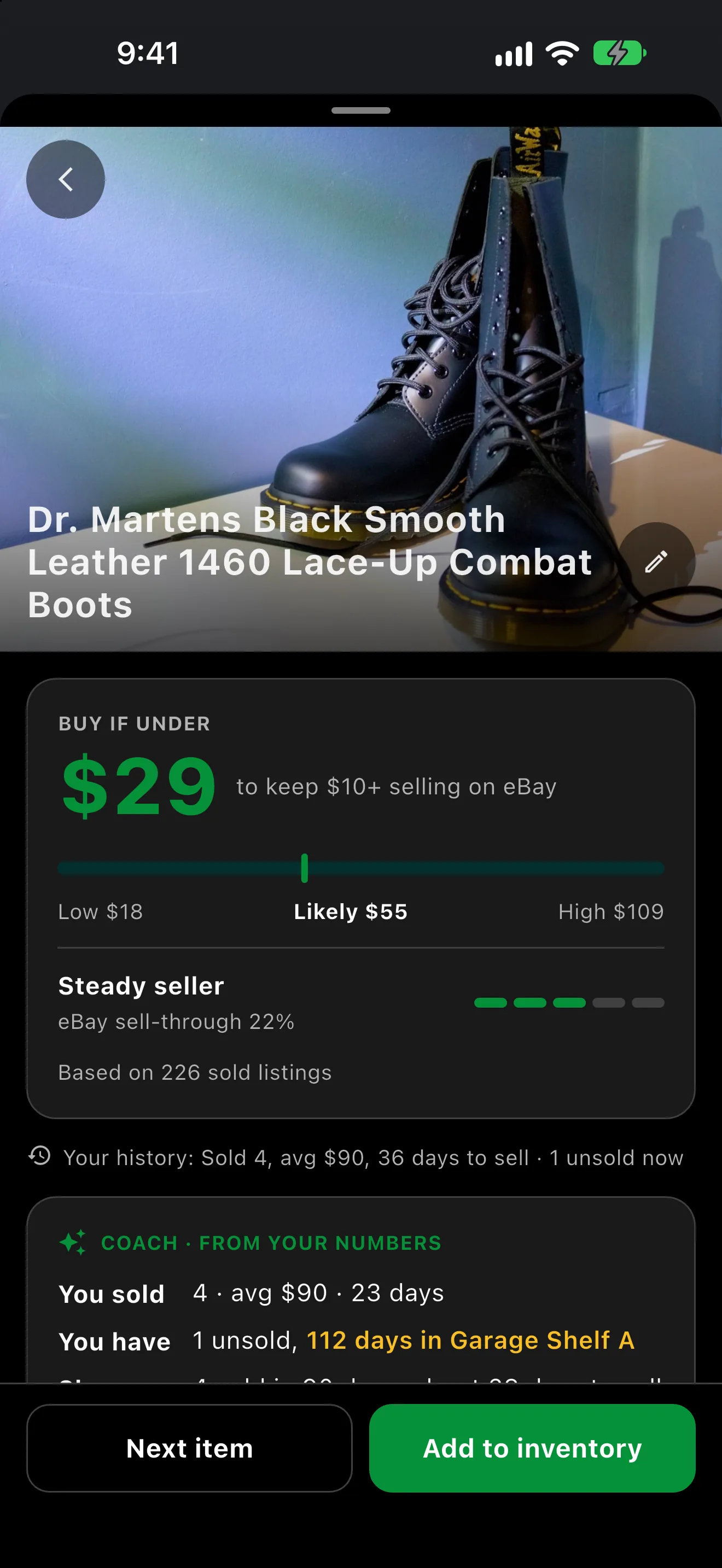
Buy if under $29, from 226 sold listings.
Here's a pair of Dr. Martens 1460 boots. Snap found 226 sold listings and gives you the range: low $18, likely $55, high $109. The number at the top is still the one to read in the aisle. Buy if under $29 is the most you can pay and still keep your $10 minimum after fees and shipping.
Under the range you get a read on how quickly it moves. These boots are a Steady seller with an eBay sell-through of 22%. A fast seller at a thin margin and a slow one at a fat margin are different buys, and now you can see which one you're holding.
If Snap can't find sold listings for an item, it falls back to active eBay asking prices and says so on the screen, so you always know which kind of number you're looking at.
Where it sells, and what you keep
The same boots don't sell for the same price everywhere, and every platform takes a different cut. Snap now shows both.
 What you'd keep on each platform, after its fees and your shipping.
| Platform | Likely sold price | Sold listings | You keep |
|---|---|---|---|
| Mercari | $50 | 98 | $36 |
| eBay | $63 | 80 | $46 |
| Poshmark | $56 | 48 | $37 |
Then type what the store is asking. At $8 for the boots, the math looks like this:
| Line | Dr. Martens 1460 |
|---|---|
| Resale estimate (sold) | $55.00 |
| eBay fees (12.9% + $0.40) | −$7.50 |
| Shipping + packing | −$8.00 |
| Your cost | −$8.00 |
| Profit | $31.50 (394% return) |
Fees come from your own platform settings, and shipping comes from your pricing preferences, the same as before.
Check the listings yourself
We still don't want you trusting a magic number. Tap the listings count and Snap shows every sold listing behind the estimate, grouped by marketplace, each with the date it sold and how closely it matches your item.
 Every sold listing behind the estimate, with a match score.
A 100% match is the same boot. A 33% match is a cousin. Tap any listing to open it and judge for yourself.
It knows your own history
A market price is one thing. How the item sells for you is another. If you've sold similar items before, Snap shows it next to the verdict: how many you sold, your average price, and how long they took. It also tells you if you already have one sitting unsold, and where it's stored, which is a good reason to pass on a second.
Want a second opinion? Ask Coach hands the scan to your Coach, who answers with your own numbers in mind.
Piles work the same way
Snap a whole table and Snap counts what it sees.
 Seven baskets, one photo.
From there you choose: Price them all one by one, tell Snap It's one item, or price the group to Sell as a lot. Matching sets are still priced as one lot, the way they were at launch.
What it still isn't
- It's a gut check, not an appraisal. A first pressing, a signed piece, or a chip on the rim can change an item's value, and no photo will catch all of that.
- It doesn't authenticate anything. Snap reads what's in the photo. It can't tell you a designer bag or a gold stamp is real. Look the item over and make your own call.
- If it can't tell what something is, it says so instead of guessing a price. A closer photo usually fixes it.
- Sold prices are a range. Condition, size and timing move where your sale lands inside it. That's why you get low, likely and high, not one number.
How to try it
Update to Flippd 4.18 or later, then open Tools > Snap an item, or choose it from the Add menu. The guided camera is in the iPhone and Android apps. Snap is on every plan, and free accounts get a daily scan limit. The Snap help article has the step-by-step.
When you buy, tap Add to inventory. The item, its photo and your cost go straight into your inventory, so the price you paid in the aisle is the cost your profit report uses when it sells.
Key Takeaways
- Snap has its own camera now: it frames the item, then asks for the close-up that matters for that kind of item
- Verdicts are based on what similar items sold for, with asking prices only as a labelled backup
- Where it sells shows the likely sold price and what you'd keep on each platform
- You can open every sold listing behind an estimate and see how closely it matches
- Your own sales history and unsold stock show up next to the verdict
- It's still a fast gut check, not an appraisal, and it doesn't authenticate items
Ready to stop buying on vibes? Flippd helps resellers log purchases, track inventory, and calculate true profit after all fees and expenses, right from your phone. iPhone, iPad, Android, Mac, Apple Watch, and Web.